Retrieving SMART Data in Delphi|How to Check SSD/HDD Health Status
This page explains how to retrieve SMART information (Self-Monitoring Analysis and Reporting Technology) from SATA-connected SSDs and hard drives using Delphi.
If you want to check SATA SMART data and NVMe Health Information Logs all at once, try the Windows application developed in Delphi:
SMART/Health Information Log Reader 3.0.
If you need to obtain Health Information data from an NVMe M.2 SSD using Delphi, please refer to the following source code:
Sample code for retrieving Health Information from an NVMe M.2 SSD
For SATA-based M.2 SSDs (SATA-type M.2), SMART information can be retrieved using the source code provided on this page.
This page explains how to create a unit that reads disk health status and attribute values, along with sample code demonstrating an implementation using the DeviceIoControl API.
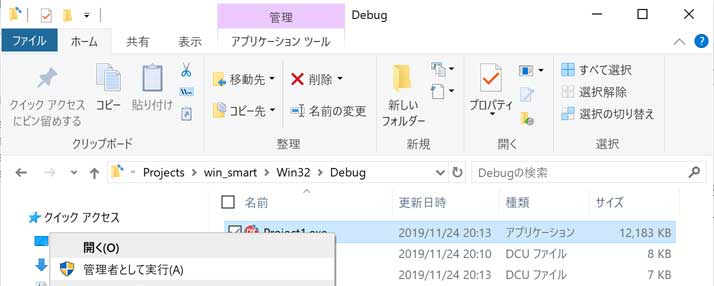
Running the application with administrator privileges is required.
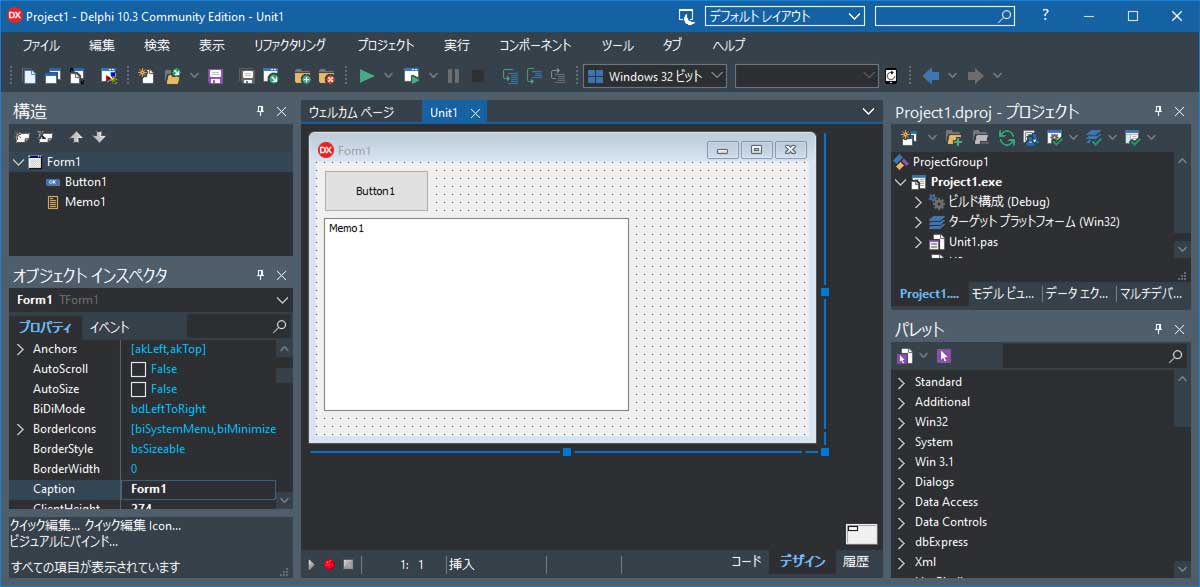
Create a New Project in Delphi
Launch Delphi, then select File → New → Windows VCL Application.
Choose a blank application and click OK to create the project.
Drag and drop a TButton and a TMemo onto the form.
Click “Save All” to create a project folder and save the project and unit files.
Creating the SMART Information Retrieval Unit
Select File → New → Unit – Delphi to create a new unit.
Enter the source code shown below and save the file as “USmart.pas”.
unit USmart;

interface

uses Winapi.Windows, System.SysUtils;

type
  TMamSmart=record
    AttrID:Byte;
    StatusFlags:Word;
    Value:Byte;
    WorstValue:Byte;
    Threshold:Byte;
    RawValue:Array[0..5] of Byte;
  end;
  TMamSmartArray=Array of TMamSmart;

// Given DriveNum (starting from 0) and MamSmartArray, retrieves SMART information and stores it in MamSmartArray
procedure getSmart(DriveNum:Integer;var MamSmartArray:TMamSmartArray);

implementation

const
  NUM_ATTR_STRUCTS = 30;
  SMART_READ_ATTRIBUTE_VALUES = $D0;
  SMART_READ_ATTRIBUTE_THRESHOLDS = $D1;

  SMART_CYL_LOW  = $4F;
  SMART_CYL_HIGH = $C2;
  // SMART_CMD: Performs a SMART command
  IDE_EXECUTE_SMART_FUNCTION = $B0;
  // BUFFER SIZE
  READ_ATTRIBUTE_BUFFER_SIZE = 512;
  // Commands for the DeviceIoControl API
  DFP_GET_VERSION          = $00074080;
  DFP_SEND_DRIVE_COMMAND   = $0007c084;
  DFP_RECEIVE_DRIVE_DATA   = $0007c088;

type
  // Structure for SMART attribute information
  DriveAttribute = packed record
    bAttrID:Byte;
    wStatusFlags:Word;
    bAttrValue:Byte;
    bWorstValue:Byte;
    bRawValue:array[0..5] of Byte;
    bReserved:Byte;
  end;

  // Structures for IN/OUT parameters of the DFP_RECEIVE_DRIVE_DATA command
  _IDEREGS=packed record
    bFeaturesReg:Byte;
    bSectorCountReg:Byte;
    bSectorNumberReg:Byte;
    bCylLowReg:Byte;
    bCylHighReg:Byte;
    bDriveHeadReg:Byte;
    bCommandReg:Byte;
    bReserved:Byte;
  end;
  IDEREGS=_IDEREGS;

  _SENDCMDINPARAMS=packed record
    cBufferSize:DWORD;
    irDriveRegs:IDEREGS;
    bDriveNumber:Byte;
    bReserved:array[0..2] of Byte;
    dwReserved:array[0..3] of DWORD;
    bBuffer:array[0..0] of Byte;
  end;
  SENDCMDINPARAMS=_SENDCMDINPARAMS;

  _DRIVERSTATUS = packed record
    bDriveError:Byte;
    bIDEStatus:Byte;
    bReserved:array[0..1] of Byte;
    dwReserved:array[0..1] of DWORD;
  end;
  DRIVERSTATUS=_DRIVERSTATUS;

  _BSENDCMDOUTPARAMS = packed record
    cBufferSize:DWORD;
    DriverStatus:DRIVERSTATUS;
    bBuffer:array [0..511] of Byte;
  end;
  BSENDCMDOUTPARAMS=_BSENDCMDOUTPARAMS;

  BDriveAttribute = packed record
    AttrStructRevision:WORD;
    DA:array[0..NUM_ATTR_STRUCTS-1] of DriveAttribute;
  end;
  PBDriveAttribute =^BDriveAttribute;

  // Structure for SMART threshold information
  AttrThreshold = packed record
    bAttrID:Byte;
    bWarrantyThreshold:Byte;
    bReserved:array[0..9] of Byte;
  end;
  BAttrThreshold = packed record
    ThreStructRevision:Word;
    AT:array[0..NUM_ATTR_STRUCTS-1] of AttrThreshold
  end;
  PBAttrThreshold =^BAttrThreshold;

procedure getSmart(DriveNum:Integer;var MamSmartArray:TMamSmartArray);
var hd:THandle;
    st:string;
    wst:array[0..127] of char;
    br:Cardinal;
    SCIP:SENDCMDINPARAMS;
    SCOP_ATTR:BSENDCMDOUTPARAMS;
    SCOP_THRE:BSENDCMDOUTPARAMS;
    PBAttr:PBDriveAttribute;
    PBThre:PBAttrThreshold;
    i,ct:Integer;
begin
  st:='\\.\PhysicalDrive'+Trim(InttoStr(DriveNum));
  strpcopy(wst,st);

  // Obtain device handle
  hd:=CreateFile(wst,GENERIC_READ or GENERIC_WRITE,
                       FILE_SHARE_READ or FILE_SHARE_WRITE,
                       nil, OPEN_EXISTING, 0, 0);

  if hd = INVALID_HANDLE_VALUE then exit;

  ZeroMemory(@SCIP,SizeOf(SENDCMDINPARAMS));
  ZeroMemory(@SCOP_ATTR,SizeOf(BSENDCMDOUTPARAMS));

  SCIP.irDriveRegs.bFeaturesReg:=SMART_READ_ATTRIBUTE_VALUES;
  SCIP.irDriveRegs.bSectorCountReg:=1;
  SCIP.irDriveRegs.bSectorNumberReg:=1;
  SCIP.irDriveRegs.bCylLowReg:=SMART_CYL_LOW;
  SCIP.irDriveRegs.bCylHighReg:=SMART_CYL_HIGH;
  SCIP.irDriveRegs.bDriveHeadReg:=$A0 or ((DriveNum and 1) shl 4);
  SCIP.irDriveRegs.bCommandReg:=IDE_EXECUTE_SMART_FUNCTION;
  SCIP.cBufferSize:=READ_ATTRIBUTE_BUFFER_SIZE;
  SCIP.bDriveNumber:=DriveNum;

  DeviceIoControl(hd,DFP_RECEIVE_DRIVE_DATA,
    @SCIP,sizeof(SCIP),@SCOP_ATTR,sizeof(SCOP_ATTR),br,nil);
  PBAttr:=PBDriveAttribute(Pointer(@(SCOP_ATTR.bBuffer)[0]));

  ZeroMemory(@SCIP,SizeOf(SENDCMDINPARAMS));
  ZeroMemory(@SCOP_THRE,SizeOf(BSENDCMDOUTPARAMS));

  SCIP.irDriveRegs.bFeaturesReg:=SMART_READ_ATTRIBUTE_THRESHOLDS;
  SCIP.irDriveRegs.bSectorCountReg:=1;
  SCIP.irDriveRegs.bSectorNumberReg:=1;
  SCIP.irDriveRegs.bCylLowReg:=SMART_CYL_LOW;
  SCIP.irDriveRegs.bCylHighReg:=SMART_CYL_HIGH;
  SCIP.irDriveRegs.bDriveHeadReg:=$A0 or ((DriveNum and 1) shl 4);
  SCIP.irDriveRegs.bCommandReg:=IDE_EXECUTE_SMART_FUNCTION;
  SCIP.cBufferSize:=READ_ATTRIBUTE_BUFFER_SIZE;
  SCIP.bDriveNumber:=DriveNum;

  DeviceIoControl(hd,DFP_RECEIVE_DRIVE_DATA,
    @SCIP,sizeof(SCIP),@SCOP_THRE,sizeof(SCOP_THRE),br,nil);
  PBThre:=PBAttrThreshold(pointer(@SCOP_THRE.bBuffer));
  CloseHandle(hd);

  setlength(MamSmartArray,0);
  ct:=0;
  for i := 0 to NUM_ATTR_STRUCTS-1 do
  begin
    if PBAttr.DA[i].bAttrID>0 then
    begin
      inc(ct);
      setlength(MamSmartArray,ct);
      MamSmartArray[ct-1].AttrID:=PBAttr.DA[i].bAttrID;
      MamSmartArray[ct-1].StatusFlags:=PBAttr.DA[i].wStatusFlags;
      MamSmartArray[ct-1].Value:=PBAttr.DA[i].bAttrValue;
      MamSmartArray[ct-1].WorstValue:=PBAttr.DA[i].bWorstValue;
      MamSmartArray[ct-1].Threshold:=PBThre.AT[i].bWarrantyThreshold;
      MamSmartArray[ct-1].RawValue[0]:=PBAttr.DA[i].bRawValue[0];
      MamSmartArray[ct-1].RawValue[1]:=PBAttr.DA[i].bRawValue[1];
      MamSmartArray[ct-1].RawValue[2]:=PBAttr.DA[i].bRawValue[2];
      MamSmartArray[ct-1].RawValue[3]:=PBAttr.DA[i].bRawValue[3];
      MamSmartArray[ct-1].RawValue[4]:=PBAttr.DA[i].bRawValue[4];
      MamSmartArray[ct-1].RawValue[5]:=PBAttr.DA[i].bRawValue[5];
    end;
  end;
end;

end.
Writing the Source Code for the Button1 Click Event
Double‑click Button1 on the Unit1 form to open the event handler and write the source code.
unit Unit1;

interface

uses
  Winapi.Windows, Winapi.Messages, System.SysUtils, System.Variants, System.Classes, Vcl.Graphics,
  Vcl.Controls, Vcl.Forms, Vcl.Dialogs, Vcl.StdCtrls
  ,System.Win.Registry ,USmart;
type
  TForm1 = class(TForm)
    Memo1: TMemo;
    Button1: TButton;
    procedure Button1Click(Sender: TObject);
  private
    { Private declarations }
  public
    { Public declarations }
  end;
var
  Form1: TForm1;

implementation
{$R *.dfm}

procedure TForm1.Button1Click(Sender: TObject);
var reg:TRegistry;
    i,j,ct:integer;
    smart:TMamSmartArray;
begin
  ct:=0;
  // Retrieve the number of physical drives from the registry
  reg:=TRegistry.Create(Winapi.Windows.KEY_READ);
  reg.RootKey:=HKEY_LOCAL_MACHINE;
  if reg.KeyExists(
    'SYSTEM\CurrentControlSet\Services\disk\Enum') then
  begin
    reg.OpenKey('SYSTEM\CurrentControlSet\Services\disk\Enum',False);
    ct:=reg.ReadInteger('Count');
  end;
  reg.CloseKey;
  reg.Free;

  // Loop through all physical drives
  for i := 0 to ct-1 do
  begin
    // Retrieve SMART information
    getSmart(i,smart);

    // If SMART information was successfully retrieved
    if length(smart)>0 then
    begin
      memo1.Lines.Add('DriveNum:'+IntToStr(i));

      // Loop through all SMART attributes
      for j := 0 to length(smart)-1 do
      begin
        memo1.Lines.Add(
          format('%3d,%4d,%2d,%2d,%2d,%2.2x%2.2x%2.2x%2.2x%2.2x%2.2x',
          [ smart[j].AttrID, smart[j].StatusFlags,
            smart[j].Value,  smart[j].WorstValue, smart[j].Threshold,
            smart[j].RawValue[5], smart[j].RawValue[4],
            smart[j].RawValue[3], smart[j].RawValue[2],
            smart[j].RawValue[1], smart[j].RawValue[0]
          ])
        );
      end;
    end;
  end;
end;

end.
Compile
Select [Project] → [Compile All Projects] to build the application.
Run
This application requires administrator privileges (the DeviceIoControl API cannot be used without them),
so clicking the Run button and then pressing Button1 will not work.
Right‑click the compiled executable file, choose “Run as administrator,” then click Button1.