How to Retrieve SMART Information from NVMe SSDs in Delphi|Health Log & IOCTL Usage Example
This page explains how to retrieve SMART information (Health Information Log) from NVMe‑connected SSDs using Delphi.
It provides an implementation example that uses Windows IOCTL_STORAGE_QUERY_PROPERTY to check the health status of NVMe storage devices.
This is a technical note for developers who want to perform diagnostics or retrieve logs from NVMe SSDs in Delphi.
If you want to obtain S.M.A.R.T. information (disk health data) from SATA‑connected SSDs/HDDs or SATA‑type M.2 SSDs, please refer to the following page:
Retrieve SMART Information from SATA SSDs and Hard Drives (https://mam-mam.net/en/delphi/smart.html)
Launch Delphi with Administrator Privileges
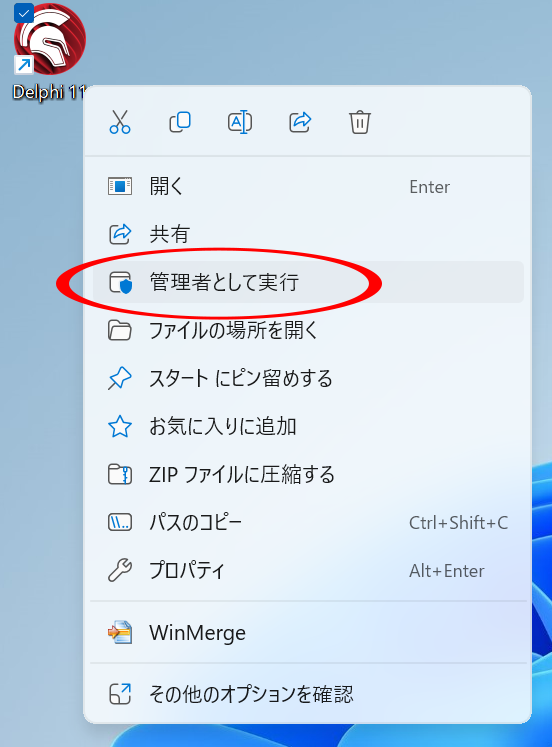
Start Delphi with administrator privileges.
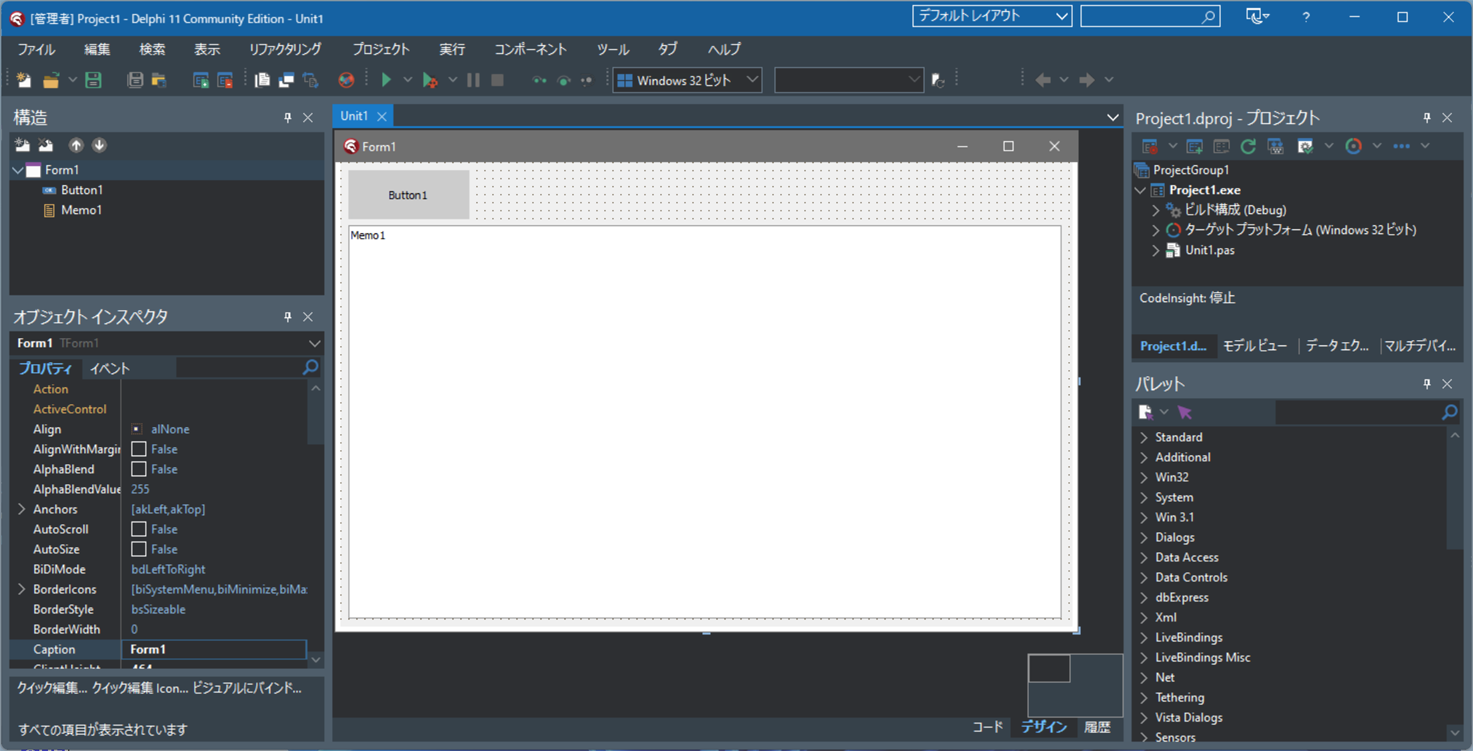
Creating a New Project and Designing the Form
Select File → New → Windows VCL Application,
choose a blank application, and click OK to create the project.
Drag and drop a TButton and a TMemo onto the form.
Click “Save All” to create a project folder and save the project and unit files.
Configure the Application to Run with Administrator Privileges
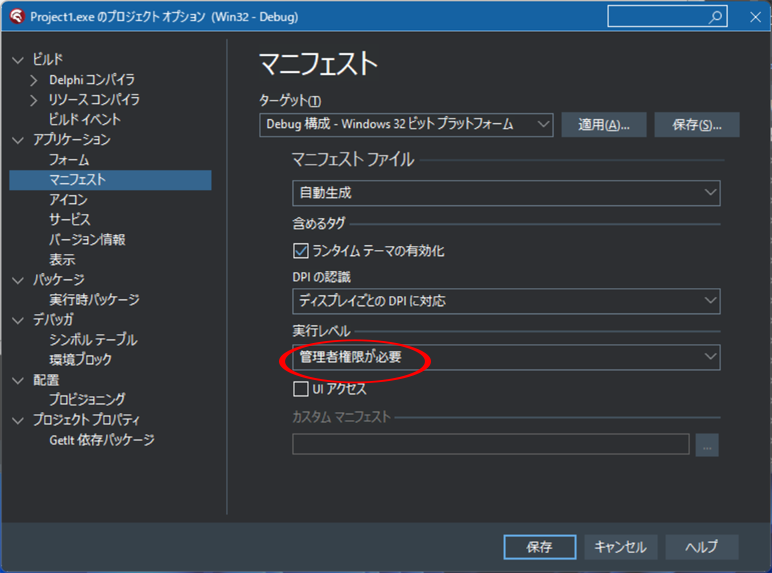
Click [Project] → [Options].
In the left pane, select [Application] → [Manifest].
Set the execution level to “Require administrator” and click the “Save” button.
Writing the Source Code
Double‑click “Button1” to open the event handler and write the source code.
unit Unit1;

interface

uses
  Winapi.Windows, Winapi.Messages, System.SysUtils, System.Variants,
  System.Classes, Vcl.Graphics, Vcl.Controls, Vcl.Forms, Vcl.Dialogs, Vcl.StdCtrls
  ,System.Win.Registry, Vcl.Grids;

type
  TForm1 = class(TForm)
    Button1: TButton;
    Memo1: TMemo;
    procedure Button1Click(Sender: TObject);
  private
    { Private declarations }
  public
    { Public declarations }
  end;

  NVMeStorageQueryProperty =packed record
    PropertyId:UInt32;    //STORAGE_PROPERTY_ID
    QueryType:UInt32;     //STORAGE_QUERY_TYPE
    ProtocolType:UInt32;  //STORAGE_PROTOCOL_TYPE
    DataType:UInt32;      //STORAGE_PROTOCOL_NVME_DATA_TYPE
    ProtocolDataRequestValue:UInt32;
    ProtocolDataRequestSubValue:UInt32;
    ProtocolDataOffset:UInt32;
    ProtocolDataLength:UInt32;
    FixedProtocolReturnData:UInt32;
    ProtocolDataRequestSubValue2:UInt32;
    ProtocolDataRequestSubValue3:UInt32;
    ProtocolDataRequestSubValue4:UInt32;
    SMARTData:Array[0..511] of Byte;
  end;
  TNVMeStorageQueryProperty=NVMeStorageQueryProperty;

  STORAGE_PROPERTY_QUERY = packed record
    PropertyId: UInt32; //STORAGE_PROPERTY_ID
    QueryType: UInt32;  //STORAGE_QUERY_TYPE
    AdditionalParameters: array [0..0] of Byte;
  end;
  TStoragePropertyQuery=STORAGE_PROPERTY_QUERY;

  STORAGE_PROTOCOL_SPECIFIC_DATA=packed record
    ProtocolType:UInt32;//STORAGE_PROTOCOL_TYPE
    DataType:UInt32;    //STORAGE_PROTOCOL_NVME_DATA_TYPE
    ProtocolDataRequestValue:UInt32;
    ProtocolDataRequestSubValue:UInt32;
    ProtocolDataOffset:UInt32;
    ProtocolDataLength:UInt32;
    FixedProtocolReturnData:UInt32;
    ProtocolDataRequestSubValue2:UInt32;
    ProtocolDataRequestSubValue3:UInt32;
    ProtocolDataRequestSubValue4:UInt32;
  end;
  TStorageProtocolSpecificData=STORAGE_PROTOCOL_SPECIFIC_DATA;
  PStorageProtocolSpecificData=^TStorageProtocolSpecificData;

  NVME_HEALTH_INFO_LOG=packed record
    DUMMYSTRUCTNAME:Byte;
    Temperature:Array[0..1] of Byte;
    AvailableSpare:Byte;
    AvailableSpareThreshold:Byte;
    PercentageUsed:Byte;
    Reserved0:array[0..25] of Byte;
    DataUnitRead:array[0..15] of Byte;
    DataUnitWritten:array[0..15] of Byte;
    HostReadCommands:array[0..15] of Byte;
    HostWrittenCommands:array[0..15] of Byte;
    ControllerBusyTime:array[0..15] of Byte;
    PowerCycle:array[0..15] of Byte;
    PowerOnHours:array[0..15] of Byte;
    UnsafeShutdowns:array[0..15] of Byte;
    MediaErrors:array[0..15] of Byte;
    ErrorInfoLogEntryCount:array[0..15] of Byte;
    WarningCompositeTemperatureTime:Cardinal;
    CriticalCompositeTemperatureTime:Cardinal;
    TemperatureSensor1:Word;
    TemperatureSensor2:Word;
    TemperatureSensor3:Word;
    TemperatureSensor4:Word;
    TemperatureSensor5:Word;
    TemperatureSensor6:Word;
    TemperatureSensor7:Word;
    TemperatureSensor8:Word;
    Reserved1:array[0..295] of Byte;
  end;
  TNVMeHealthInfoLog=NVME_HEALTH_INFO_LOG;
  PNVMeHealthInfoLog=^TNVMeHealthInfoLog;

  STORAGE_PROPERTY_ID = (
    StorageDeviceProperty = 0,
    StorageAdapterProperty,
    StorageDeviceIdProperty,
    StorageDeviceUniqueIdProperty,
    StorageDeviceWriteCacheProperty,
    StorageMiniportProperty,
    StorageAccessAlignmentProperty,
    StorageDeviceSeekPenaltyProperty,
    StorageDeviceTrimProperty,
    StorageDeviceWriteAggregationProperty,
    StorageDeviceDeviceTelemetryProperty,
    StorageDeviceLBProvisioningProperty,
    StorageDevicePowerProperty,
    StorageDeviceCopyOffloadProperty,
    StorageDeviceResiliencyProperty,
    StorageDeviceMediumProductType,
    StorageAdapterRpmbProperty,
    StorageAdapterCryptoProperty,
    StorageDeviceIoCapabilityProperty = 48,
    StorageAdapterProtocolSpecificProperty,
    StorageDeviceProtocolSpecificProperty,
    StorageAdapterTemperatureProperty,
    StorageDeviceTemperatureProperty,
    StorageAdapterPhysicalTopologyProperty,
    StorageDevicePhysicalTopologyProperty,
    StorageDeviceAttributesProperty,
    StorageDeviceManagementStatus,
    StorageAdapterSerialNumberProperty,
    StorageDeviceLocationProperty,
    StorageDeviceNumaProperty,
    StorageDeviceZonedDeviceProperty,
    StorageDeviceUnsafeShutdownCount,
    StorageDeviceEnduranceProperty,
    StorageDeviceLedStateProperty,
    StorageDeviceSelfEncryptionProperty = 64,
    StorageFruIdProperty
  );

  STORAGE_QUERY_TYPE = (
    PropertyStandardQuery = 0,
    PropertyExistsQuery,
    PropertyMaskQuery,
    PropertyQueryMaxDefined
  );

  STORAGE_PROTOCOL_TYPE=(
    ProtocolTypeUnknown = $00,
    ProtocolTypeScsi,
    ProtocolTypeAta,
    ProtocolTypeNvme,
    ProtocolTypeSd,
    ProtocolTypeUfs,
    ProtocolTypeProprietary = $7E,
    ProtocolTypeMaxReserved = $7F
  );

  STORAGE_PROTOCOL_NVME_DATA_TYPE=(
    NVMeDataTypeUnknown,
    NVMeDataTypeIdentify,
    NVMeDataTypeLogPage,
    NVMeDataTypeFeature
  );

var
  Form1: TForm1;

const
  NVME_NAMESPACE_ALL:UINT32              =$FFFFFFFF;
  NVME_LOG_PAGE_ERROR_INFO               = $01;
  NVME_LOG_PAGE_HEALTH_INFO              = $02;
  NVME_LOG_PAGE_FIRMWARE_SLOT_INFO       = $03;
  NVME_LOG_PAGE_CHANGED_NAMESPACE_LIST   = $04;
  NVME_LOG_PAGE_COMMAND_EFFECTS          = $05;
  NVME_LOG_PAGE_DEVICE_SELF_TEST         = $06;
  NVME_LOG_PAGE_TELEMETRY_HOST_INITIATED = $07;
  NVME_LOG_PAGE_TELEMETRY_CTLR_INITIATED = $08;
  NVME_LOG_PAGE_RESERVATION_NOTIFICATION = $80;
  NVME_LOG_PAGE_SANITIZE_STATUS          = $81;
  NVME_LOG_PAGE_VU_START                 = $C0;
  NVME_LOG_PAGE_WCS_CLOUD_SSD            = $C0;
  NVME_LOG_PAGE_VU_END                   = $FF;


implementation

{$R *.dfm}

function GetNVMeHealthInfoLog(DriveNum:Integer):TNVMeHealthInfoLog;
var hd:THandle;
    st:string;
    Buffer: array [0..4095] of Byte;
    // Create a variable that shares the same memory address as Buffer
    SPQuery:TStoragePropertyQuery absolute Buffer;
    pSPSpecificData:PStorageProtocolSpecificData;
    BytesReturned:UInt32;
    pHealthInfoLog:PNVMeHealthInfoLog;
begin
  ZeroMemory(@result,SizeOf(TNVMeHealthInfoLog));
  st:='\\.\PhysicalDrive'+Trim(InttoStr(DriveNum));
  // Obtain the device handle
  hd:=CreateFile(PChar(st),GENERIC_READ or GENERIC_WRITE,
    FILE_SHARE_READ or FILE_SHARE_WRITE, nil, OPEN_EXISTING, 0, 0
  );
  if hd<>INVALID_HANDLE_VALUE then
  begin
    ZeroMemory(@Buffer[0],Length(Buffer));
    SPQuery.PropertyId := Ord(STORAGE_PROPERTY_ID.StorageAdapterProtocolSpecificProperty);
    SPQuery.QueryType := Ord(STORAGE_QUERY_TYPE.PropertyStandardQuery);

    pSPSpecificData:=@(SPQuery.AdditionalParameters[0]);
    pSPSpecificData.ProtocolType:=ord(STORAGE_PROTOCOL_TYPE.ProtocolTypeNvme);
    pSPSpecificData.DataType:=ord(STORAGE_PROTOCOL_NVME_DATA_TYPE.NVMeDataTypeLogPage);
    pSPSpecificData.ProtocolDataRequestValue:=NVME_LOG_PAGE_HEALTH_INFO;
    pSPSpecificData.ProtocolDataRequestSubValue:=0;
    pSPSpecificData.ProtocolDataRequestSubValue2:=0;
    pSPSpecificData.ProtocolDataRequestSubValue3:=0;
    pSPSpecificData.ProtocolDataRequestSubValue4:=0;
    pSPSpecificData.ProtocolDataOffset:=SizeOf(STORAGE_PROTOCOL_SPECIFIC_DATA);//40
    pSPSpecificData.ProtocolDataLength:=sizeof(NVME_HEALTH_INFO_LOG);//512
    pHealthInfoLog:=
      @buffer[SizeOf(TStoragePropertyQuery)+
      Sizeof(TStorageProtocolSpecificData)-1];

    if DeviceIoControl(hd,IOCTL_STORAGE_QUERY_PROPERTY,
      @buffer[0],Length(buffer),
      @buffer[0],Length(Buffer),BytesReturned,nil) then
    begin
      CopyMemory(@result,pHealthInfoLog,SizeOf(TNVMeHealthInfoLog));
    end;
    CloseHandle(hd);
  end;
end;

function toRawValue(b:array of Byte):string;
var i:Integer;
begin
  result:='';
  for i := Low(b) to High(b) do
  begin
    result:=result+Format('%2.2x',[b[i]]);
  end;
end;

procedure TForm1.Button1Click(Sender: TObject);
var reg:TRegistry;
    i,ct:integer;
    InfoLog:TNVMeHealthInfoLog;
begin
  Memo1.Clear;
  ct:=0;
  //Retrieve the number of physical drives from the registry
  reg:=TRegistry.Create(Winapi.Windows.KEY_READ);
  reg.RootKey:=HKEY_LOCAL_MACHINE;
  if reg.KeyExists(
    'SYSTEM\CurrentControlSet\Services\disk\Enum') then
  begin
    reg.OpenKey('SYSTEM\CurrentControlSet\Services\disk\Enum',False);
    ct:=reg.ReadInteger('Count');
  end;
  reg.CloseKey;
  reg.Free;

  for i := 0 to ct-1 do //Loop through all physical drives
  begin
    InfoLog:=GetNVMeHealthInfoLog(i);
    if (InfoLog.Temperature[0]<>0) or (InfoLog.Temperature[1]<>0) then
    begin
      Memo1.Lines.Add(
        Format('Temperature:%d℃',
          [InfoLog.Temperature[0]+(InfoLog.Temperature[1] shl 8)-273]
        )
        +#13#10+
        Format('AvailableSpare:%d%%',[InfoLog.AvailableSpare])
        +#13#10+
        Format('AvailableSpareThreshold:%d%%',[InfoLog.AvailableSpareThreshold])
        +#13#10+
        Format('PercentageUsed:%d%%',[InfoLog.PercentageUsed])
        +#13#10+
        Format('DataUnitRead:%s',[toRawValue(InfoLog.DataUnitRead)])
        +#13#10+
        Format('DataUnitWritten:%s',[toRawValue(InfoLog.DataUnitWritten)])
        +#13#10+
        Format('HostReadCommands:%s',[toRawValue(InfoLog.HostReadCommands)])
        +#13#10+
        Format('HostWrittenCommands:%s',[toRawValue(InfoLog.HostWrittenCommands)])
        +#13#10+
        Format('ControllerBusyTime:%s',[toRawValue(InfoLog.ControllerBusyTime)])
        +#13#10+
        Format('PowerCycle:%s',[toRawValue(InfoLog.PowerCycle)])
        +#13#10+
        Format('PowerOnHours:%s',[toRawValue(InfoLog.PowerOnHours)])
        +#13#10+
        Format('UnsafeShutdowns:%s',[toRawValue(InfoLog.UnsafeShutdowns)])
        +#13#10+
        Format('MediaErrors:%s',[toRawValue(InfoLog.MediaErrors)])
        +#13#10+
        Format('ErrorInfoLogEntryCount:%s',
          [toRawValue(InfoLog.ErrorInfoLogEntryCount)]
        )
        +#13#10+
        Format('WarningCompositeTemperatureTime:%d',
          [InfoLog.WarningCompositeTemperatureTime]
        )
        +#13#10+
        Format('CriticalCompositeTemperatureTime:%d',
          [InfoLog.CriticalCompositeTemperatureTime]
        )
      );

      Memo1.Lines.Add(
        Format('TemperatureSensor1:%d', [InfoLog.TemperatureSensor1])
        +#13#10+
        Format('TemperatureSensor2:%d', [InfoLog.TemperatureSensor2])
        +#13#10+
        Format('TemperatureSensor3:%d', [InfoLog.TemperatureSensor3])
        +#13#10+
        Format('TemperatureSensor4:%d', [InfoLog.TemperatureSensor4])
        +#13#10+
        Format('TemperatureSensor5:%d', [InfoLog.TemperatureSensor5])
        +#13#10+
        Format('TemperatureSensor6:%d', [InfoLog.TemperatureSensor6])
        +#13#10+
        Format('TemperatureSensor7:%d', [InfoLog.TemperatureSensor7])
        +#13#10+
        Format('TemperatureSensor8:%d', [InfoLog.TemperatureSensor8])
      );
    end;
  end;
end;

end.
Run the Application
Click [Run] → [Run], or press the “Run” button to execute the application.
(The project will be compiled and then executed.)
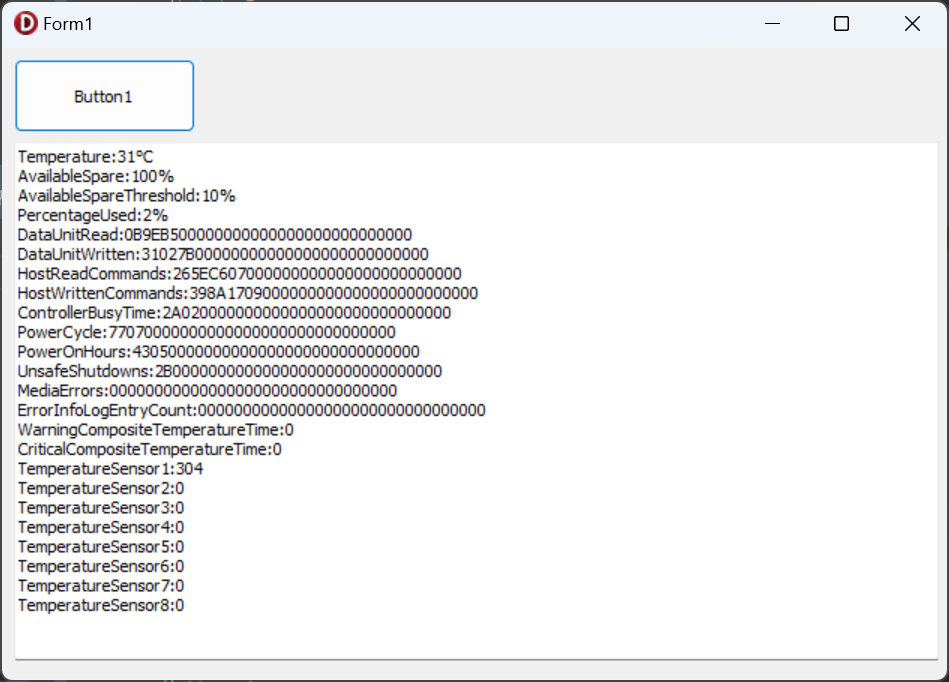
If your system has an NVMe‑connected M.2 SSD, clicking “Button1” will display its health information.