Creating a Resident Task Tray Application in Delphi Preventing Multiple Instances and Handling TaskbarCreated
This page explains how to create a Windows task‑tray resident application using Delphi.
The application starts with its main form hidden, displays a popup menu from the task‑tray icon, and includes practical features such as preventing multiple instances, handling OS shutdown via WM_QUERYENDSESSION, and processing the TaskbarCreated message — all with source code examples.
It is ideal for anyone who wants to build a stable background‑resident application in Delphi.
When the task‑tray icon is left‑clicked, a popup menu appears with the options "Exit" and “Show Form.”
When the form is shown, the OnCloseQuery event is used to prevent the application from closing when the user clicks the “×” button in the title bar.
However, this behavior would normally prevent Windows from shutting down, so the application must also handle the WM_QUERYENDSESSION message to allow proper OS shutdown.
Creating the Project
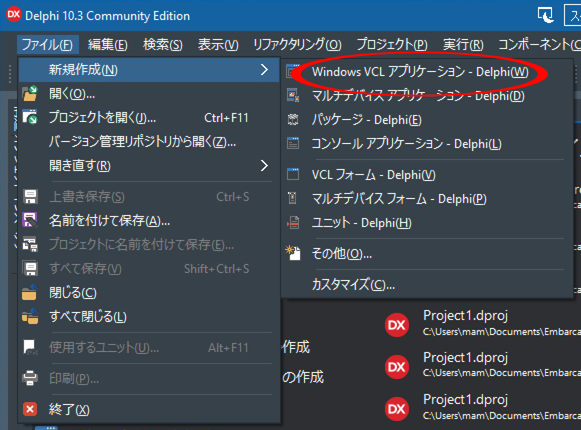
Start Delphi, then select File → New → Windows VCL Application – Delphi (W) from the menu to create a new project.
Designing the Interface
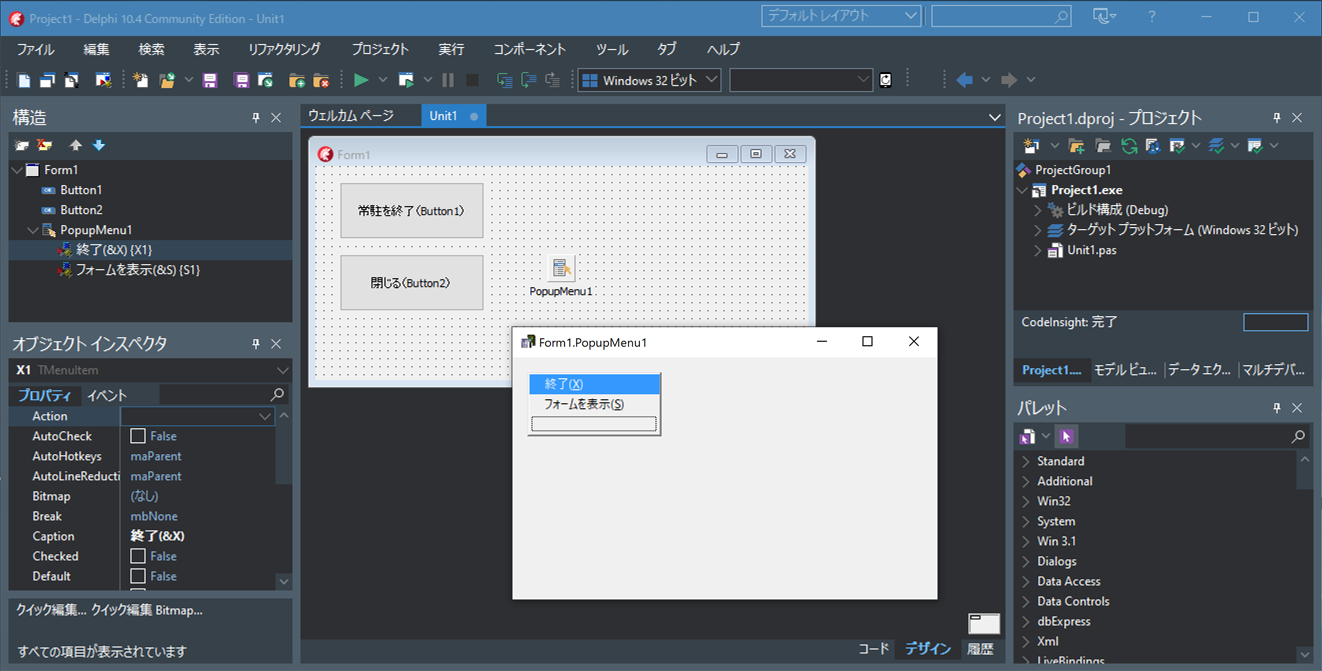
Drag and drop two TButton components onto the form.
Drag and drop a TPopupMenu component onto the form as well.
Double‑click PopupMenu1 and add the menu items "Exit (&X)" and "Show Form (&S)".
Writing the Source Code
unit Unit1;

interface

uses
  Winapi.Windows, Winapi.Messages, System.SysUtils, System.Variants,
  System.Classes, Vcl.Graphics, Vcl.Controls, Vcl.Forms, Vcl.Dialogs,
  Vcl.Menus, Vcl.StdCtrls, winapi.ShellAPI;

type
  TForm1 = class(TForm)
    Button1: TButton;
    Button2: TButton;
    PopupMenu1: TPopupMenu;
    X1: TMenuItem;
    S1: TMenuItem;
    procedure FormCreate(Sender: TObject);
    procedure FormCloseQuery(Sender: TObject; var CanClose: Boolean);
    procedure FormDestroy(Sender: TObject);
    procedure X1Click(Sender: TObject);
    procedure S1Click(Sender: TObject);
    procedure Button1Click(Sender: TObject);
    procedure Button2Click(Sender: TObject);
  private
    { Private declarations  }
    NotifyIconData: TNotifyIconData;
    //Receive notification when the taskbar is recreated
    TaskbarRestart:NativeInt;
    //True when the application should terminate
    WantTerminate:Boolean;
    //Window handle that receives notifications from the tray icon
    hTrayIcon:HWnd;
    MutexHandle:THandle;

    //Window procedure for receiving tray icon notifications
    procedure TaskTrayWndProc(var Msg: TMessage);
    //Register the task tray icon
    procedure CreateTaskTrayIcon();
    //Notification when the OS is shutting down
    procedure OSEnd(var Msg : TWMQueryEndSession);message WM_QUERYENDSESSION;
  public
    { Public declarations  }
  end;

var
  Form1: TForm1;

const
  //Unique name for the mutex to prevent multiple instances
  MutexUniqueName='Local\UNIQUE_REGIDENT_APPLICATION';


implementation

{$R *.dfm}

{ TForm1 }

procedure TForm1.Button1Click(Sender: TObject);
begin
  //When the "Exit Resident App" button is pressed, terminate the application
  WantTerminate:=True;
  Application.Terminate;
end;

procedure TForm1.Button2Click(Sender: TObject);
begin
  //When the "Close" button is pressed, hide the form
  Self.Hide;
end;

procedure TForm1.CreateTaskTrayIcon;
var ret:LongBool;
    err:Cardinal;
    ct:Integer;
begin
  ct:=0;
  repeat
    //Register the tray icon
    ret:=Shell_NotifyIcon( NIM_ADD, @NotifyIconData );
    if ret=False then
    begin
      //Get the error code
      err:=GetLastError();
      if err=ERROR_TIMEOUT then
      begin
        //Try modifying the tray icon
        ret:=Shell_NotifyIcon(NIM_MODIFY,@NotifyIconData);
      end;
    end;
    if ret=false then sleep(1000);//Wait 1 second before retrying
    inc(ct);
  until (ret=true) or (ct>20); //Wait 1 second before retrying
  //If still failing after 20 attempts, terminate the application
  if ret=false then application.Terminate;
end;


procedure TForm1.FormCloseQuery(Sender: TObject; var CanClose: Boolean);
begin
  // When the user clicks the × button, hide the window instead of closing it
  // Only allow closing when the app truly needs to terminate (OS shutdown or Exit button)

  if WantTerminate then
    CanClose:=True
  else
  begin
    CanClose:=False;
    Self.Hide;
  end;
end;

procedure TForm1.FormCreate(Sender: TObject);
begin
  //Hide the main form at startup
  Application.ShowMainForm:=False;
  Self.Hide;
  WantTerminate:=False;

  MutexHandle:=CreateMutex(nil,true,MutexUniqueName);
  if (MutexHandle<>0) and (GetLastError()=ERROR_ALREADY_EXISTS) then
  begin
    //If another instance is already running, exit immediately
    WantTerminate:=True;
    Application.Terminate;
  end;

  //Receive notification when the taskbar is recreated
  TaskbarRestart:=RegisterWindowMessage('TaskbarCreated');

  //Create a hidden window to receive tray icon notifications
  hTrayIcon := AllocateHWnd(TaskTrayWndProc);
  //
  ZeroMemory(@NotifyIconData,sizeof(TNotifyIconData));
  NotifyIconData.cbSize:=SizeOf(TNotifyIconData);
  NotifyIconData.Wnd:=hTrayIcon;
  NotifyIconData.uCallbackMessage:=WM_APP+$300;
  NotifyIconData.uID:=1;
  NotifyIconData.szTip:='Click to open menu';
  NotifyIconData.uFlags:=NIF_ICON or NIF_MESSAGE or NIF_TIP;
  //Use the application icon for the tray icon
  NotifyIconData.hIcon:=Application.Icon.Handle;
  //Register the tray icon
  CreateTaskTrayIcon();
end;


procedure TForm1.FormDestroy(Sender: TObject);
begin
  //Remove the tray icon
  Shell_NotifyIcon(NIM_DELETE,@NotifyIconData);
  //Release the hidden window used for tray notifications
  DeallocateHWnd(hTrayIcon);
  //Release the mutex
  ReleaseMutex(MutexHandle);
  CloseHandle(MutexHandle);
end;


procedure TForm1.OSEnd(var Msg: TWMQueryEndSession);
begin
  //Received "Windows OS is shutting down"
  WantTerminate:=True;
end;


procedure TForm1.S1Click(Sender: TObject);
begin
  //ポップアップメニューの「フォームを表示」をクリックすると、このフォーム(ウィンドウ)を表示する
  self.Show;
end;

procedure TForm1.TaskTrayWndProc(var Msg: TMessage);
var ps: TPoint;
begin
  //When the left mouse button is released on the tray icon
  if Msg.LParam=WM_LBUTTONUP then
  begin
    //Get the cursor position
    GetCursorPos(ps);
    SetForegroundWindow(Handle);
    //Show PopupMenu1 at the cursor position
    PopupMenu1.Popup(ps.x,ps.y);
  end
  else if Msg.LParam=TaskbarRestart then
  begin
    //Taskbar was recreated, so re-register the tray icon
    CreateTaskTrayIcon();
  end;
end;

procedure TForm1.X1Click(Sender: TObject);
begin
  //Exit the application when "Exit" is selected from the popup menu
  WantTerminate:=True;
  Application.Terminate;
end;

end.
Running the Application
Select Run -> Run from the menu to compile and launch the application.
The task‑tray icon will appear in the Windows taskbar.
Clicking the icon will display the popup menu.