
Parsing JSON Responses from REST APIs in Delphi — Implementing a Zip Code Lookup Using TRESTClient and TJsonObject
This article introduces how to perform REST API communication in Delphi and parse JSON responses.
Using the ZipCloud postal code lookup API, it provides three implementation examples covering
communication with TRESTClient / TRESTRequest / TRESTResponse and JSON decoding using
TJsonSerializer, TJsonTextReader, and TJsonObject.
It also explains how to handle differences in JSON structures (with or without arrays), how to
format response data, and how to display the results.
This guide covers the essential techniques required for API integration and JSON parsing in Delphi,
presented with practical and easy‑to‑understand sample code.
We will use the ZipCloud postal code lookup API
(https://zipcloud.ibsnet.co.jp/doc/api) to perform REST communication and decode the JSON response
using the following three methods:
- Decode JSON using TJsonSerializer (System.JSON.Serializers)
- Decode JSON using TJsonTextReader (System.JSON.Readers, System.JSON.Builders)
- Decode JSON using TJsonObject (System.JSON)
ZipCloud Postal Code Lookup API
You can find the full API documentation at:
https://zipcloud.ibsnet.co.jp/doc/api
The basic request format is as follows:
- Request URL
- https://zipcloud.ibsnet.co.jp/api/search
- Parameter
- zipcode = 7‑digit Japanese postal code
- Method
- GET
For example, accessing:
https://zipcloud.ibsnet.co.jp/api/search?zipcode=0790177
returns the following JSON response.
{
  "message":null,
  "results":[
    {
      "address1":"北海道",
      "address2":"美唄市",
      "address2":"上美唄町協和",
      "kana1":"ホッカイドウ",
      "kana2":"ビバイシ",
      "kana3":"カミビバイチョウキョウワ",
      "prefcode":"1",
      "zipcode":"0790177"
    },
    {
      ...
    },
    ...
  ],
  status: 200
}
Designing the User Interface
After launching Delphi, create a new project by selecting
File → New → Windows VCL Application.
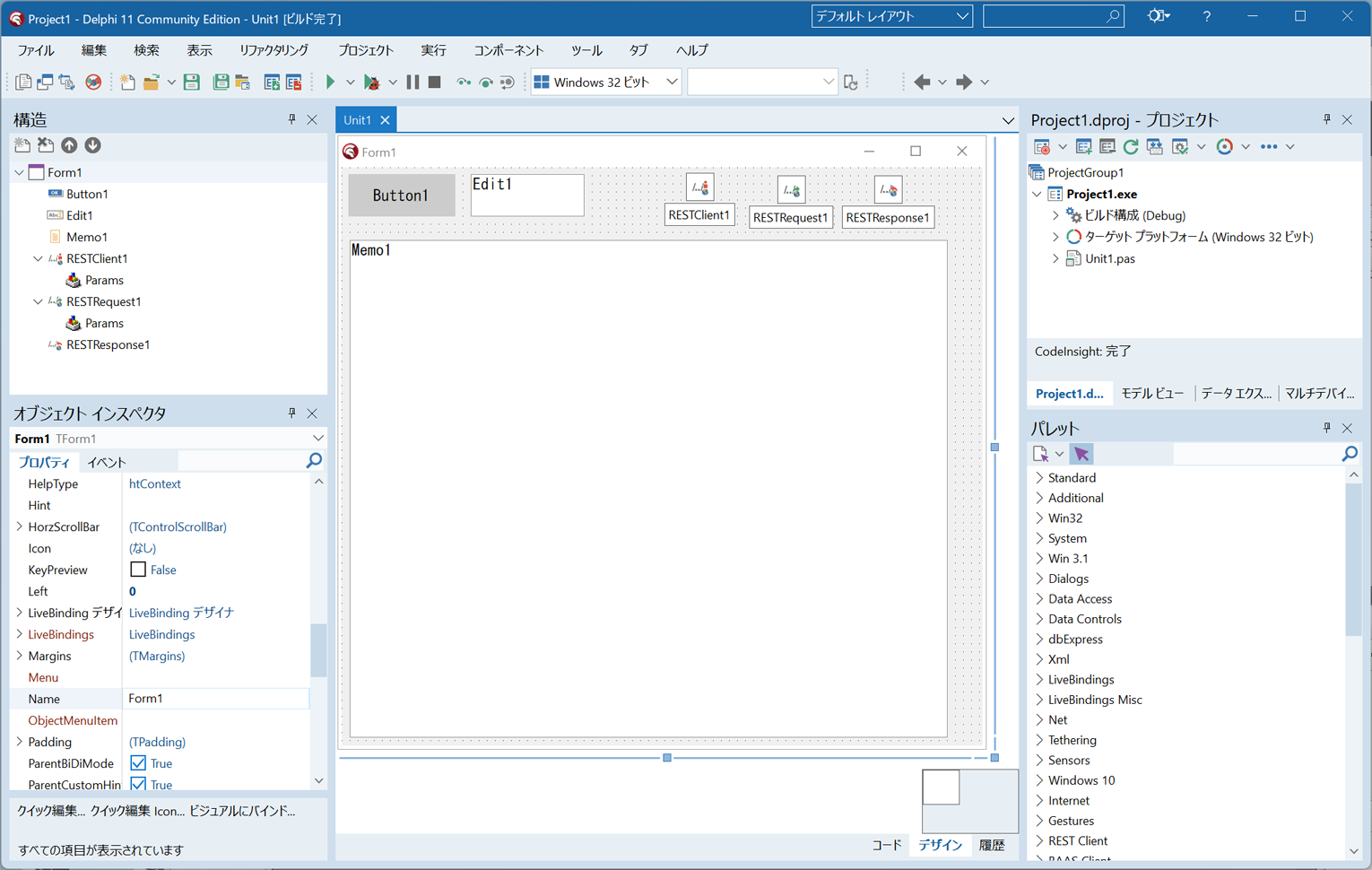
Drag and drop TRESTClient, TRESTRequest, and TRESTResponse onto the form.
Then place a TButton, TEdit, and TMemo on the form as well.
Source Code
Double‑click Button1 to open the code editor and enter the source code.
unit Unit1;

interface

uses
  Winapi.Windows, Winapi.Messages, System.SysUtils, System.Variants, System.Classes, Vcl.Graphics,
  Vcl.Controls, Vcl.Forms, Vcl.Dialogs, IPPeerClient, Vcl.StdCtrls,
  Data.Bind.Components, Data.Bind.ObjectScope, REST.Client, REST.Types,;

type
  TForm1 = class(TForm)
    RESTClient1: TRESTClient;
    RESTRequest1: TRESTRequest;
    RESTResponse1: TRESTResponse;
    Button1: TButton;
    Memo1: TMemo;
    procedure Button1Click(Sender: TObject);
  private
    { Private }
  public
    { Public }
  end;

var
  Form1: TForm1;

implementation

{$R *.dfm}

uses System.JSON.Serializers,
     System.JSON.Readers,System.JSON.Builders,
     System.JSON;

//Decode JSON using TJsonSerializer
function DecodeTJsonSerializer(AJson:string):string;
type
  TResult=record
    zipcode:string;
    prefcode:string;
    address1:string;
    address2:string;
    address3:string;
    kana1:string;
    kana2:string;
    kana3:string;
  end;
  TAddress=record
    //"message" is a reserved word in Delphi, so prefix it with "&"
    &message:string;
    results:array of TResult;
    status:Integer ;
  end;
var res:TAddress;
    s:TJsonSerializer;
    i:Integer;
begin
  s:=TJsonSerializer.Create;
  res:=s.Deserialize<TAddress>(AJson);
  for i := 0 to Length(res.results)-1 do
  begin
    result:=result+'Address:'+
      res.results[i].address1+
      res.results[i].address2+
      res.results[i].address3+#13#10;
  end;
  result:=result+'Status:'+IntToStr(res.status)+#13#10;
end;

//Decode JSON using TJsonTextReader
function DecodeTJsonTextReader(AJson:string):string;
var sr:TStringReader;
    JsonTr:TJsonTextReader;
    JsonIt:TJSONIterator;
begin
  sr:=TStringReader.Create(AJson);
  JsonTr:=TJsonTextReader.Create(sr);
  JsonIt:=TJsonIterator.Create(JsonTr);

  JsonIt.Next('results');
  JsonIt.Recurse;//Enter the array
  while JsonIt.Next do //Loop through array items
  begin
    JsonIt.Recurse;//Enter the object inside the array
    JsonIt.Next('address1');
    result:=result+'Address;'+JsonIt.AsString;
    JsonIt.Next('address2');
    result:=result+JsonIt.AsString;
    JsonIt.Next('address3');
    result:=result+JsonIt.AsString+#13#10;
    JsonIt.Return;//Exit the object
  end;
  JsonIt.Return;//Exit the object
  JsonIt.Next('status');
  result:=result+'Status:'+IntToStr(JsonIt.AsInteger)+#13#10;
end;

//Decode JSON using TJsonObject
function DecodeTJsonObject(AJson:string):string;
var jv1,jv2,jv3:TJsonValue;
    i:Integer;
begin
  jv1:=TJsonObject.ParseJSONValue(AJson);
  jv2:=jv1.GetValue<TJsonValue>('results');
  //Check whether "results" is an array
  if jv2 is TJSONArray then
  begin
    for i := 0 to TJSONArray(jv2).Count-1 do
    begin
      jv3:=TJSONArray(jv2).Items[i];
      result:=result+'Address:'+jv3.GetValue<string>('address1');
      result:=result+jv3.GetValue<string>('address2');
      result:=result+jv3.GetValue<string>('address3')+#13#10;
    end;
  end;
  result:=result+'Status:'+IntToStr(jv1.GetValue<integer>('status'));
end;


procedure TForm1.Button1Click(Sender: TObject);
var st:String;
begin
  //Configure component properties
  RESTRequest1.Client:=RESTClient1;
  RESTRequest1.Response:=RESTResponse1;
  Memo1.ScrollBars:=ssBoth;

  //Splitting the URL is optional; you may also put everything in BaseURL
  RESTClient1.BaseURL:='https://zipcloud.ibsnet.co.jp/';
  RESTRequest1.Resource:='api';
  RESTRequest1.ResourceSuffix:='search';
  //Set the HTTP method to GET
  RESTRequest1.Method:=TRestrequestMethod.rmGET;
  //Set REST API parameters
  RESTRequest1.Params.Clear;
  RESTRequest1.Params.AddItem('zipcode',Edit1.Text);//Postal code
  //Execute the REST API request
  RESTRequest1.Execute;

  //Retrieve the response (JSON text)
  st:=RESTResponse1.Content;
  //Convert LF to CRLF
  st:=StringReplace(st,#$0A,#$0D#$0A,[rfReplaceAll]);
  Memo1.Clear;
  //Display the raw JSON text
  Memo1.Lines.Add(st);
  Memo1.Lines.Add('');

  //Decode JSON using TJsonSerializer
  Memo1.Lines.Add('Decode JSON using TJsonSerializer:');
  Memo1.Lines.Add(DecodeTJsonSerializer(st));

  //Decode JSON using TJsonTextReader
  Memo1.Lines.Add('Decode JSON using TJsonTextReader:');
  Memo1.Lines.Add(DecodeTJsonTextReader(st));

  //Decode JSON using TJsonObject
  Memo1.Lines.Add('Decode JSON using TJsonObject:');
  Memo1.Lines.Add(DecodeTJsonObject(st));
end;

end.
Running the Application
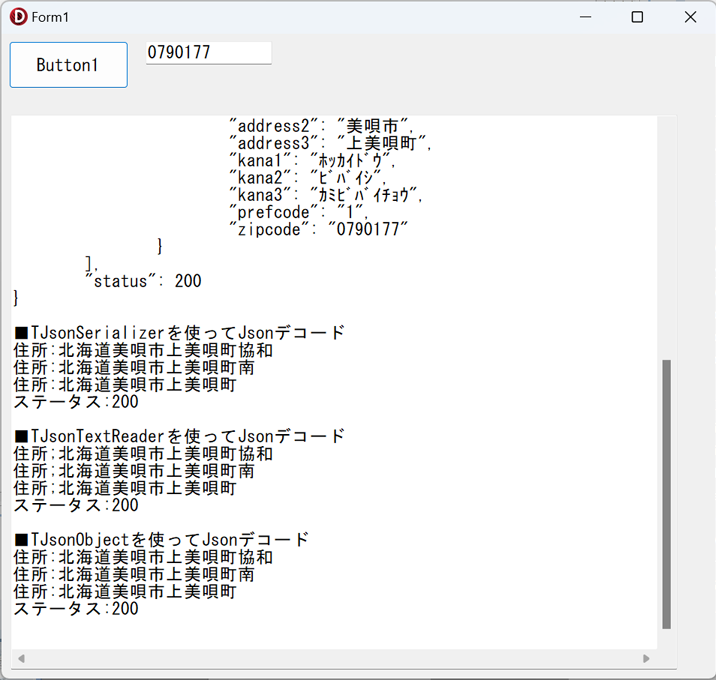
Compile and run the application.
Enter 0790177 into Edit1, then click Button1.
The REST API will be called, and the response will be displayed in Memo1.
Important Notes
Choosing whether to use TJsonSerializer, TJsonTextReader, or TJsonObject can be tricky.
Some service providers return JSON structures that differ from their own documentation.
For example, even if the API specification states that the response is always an array,
some providers return a single object instead of an array when only one record exists.
In such cases, TJsonSerializer may fail, and you will need to use TJsonObject to check
whether the value is an array and branch your processing accordingly.
In more problematic cases, certain providers may even return malformed JSON depending on the parameters.
I have encountered situations where the JSON response had to be corrected—using regular expressions or other methods—before it could be decoded properly.
There are also APIs that claim to always return an array, yet when no search results are found,
they return only a status code and message with no array at all.
When decoding JSON responses, always be aware that the structure may vary depending on the situation.