Delphi RegisterHotKey Example — Registering Global Hotkeys and Handling WM_HOTKEY
In a Delphi VCL application, if you want the program to respond to key input even when it is not the active window, registering a system‑wide global hotkey using the RegisterHotKey API is an effective approach.
This page explains how to handle WM_HOTKEY messages, manage hotkey IDs using GlobalAddAtom, and bring a window to the front with SetWindowPos, along with practical code examples.
Examples include registering keys such as CTRL + WIN + F12 and ALT + Z.
Creating the Project and Form
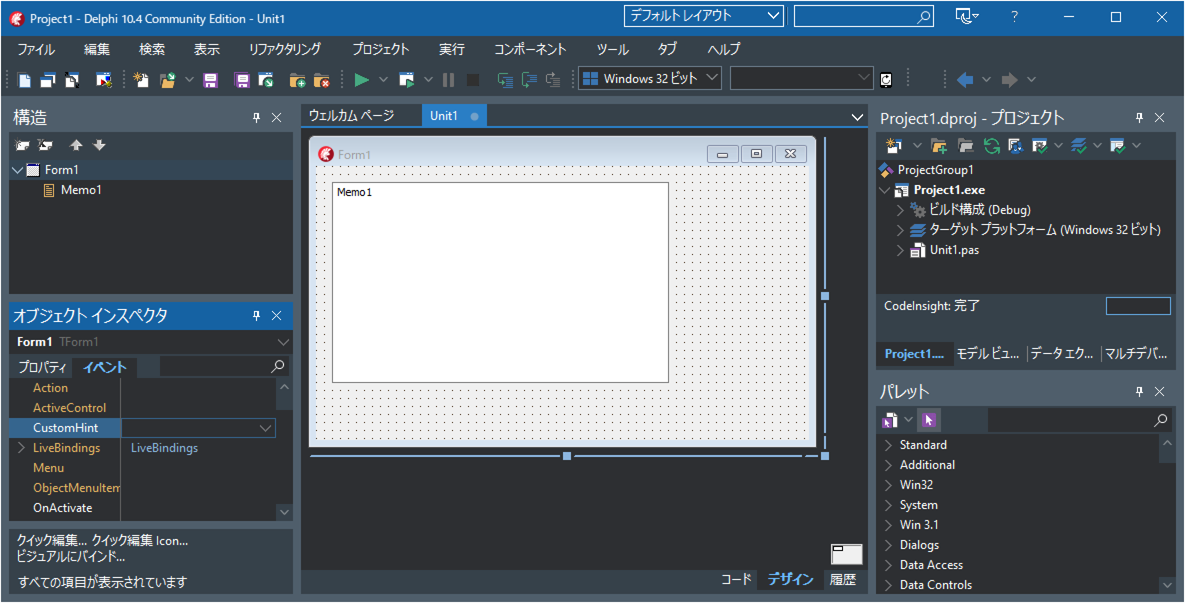
Start the Delphi IDE and select “File” → “Windows VCL Application – Delphi”.
Drag and drop the following component onto the form:
one TMemo.
Source Code
unit Unit1;

interface

uses
  Winapi.Windows, Winapi.Messages, System.SysUtils, System.Variants, System.Classes, Vcl.Graphics,
  Vcl.Controls, Vcl.Forms, Vcl.Dialogs, Vcl.StdCtrls;

type
  TForm1 = class(TForm)
    Memo1: TMemo;
    procedure FormCreate(Sender: TObject);
    procedure FormDestroy(Sender: TObject);
  private
    { Private declarations }
    FHotKeyID1:ATOM; //Hotkey ID for [CTRL] + [WIN] + [F12]
    FHotKeyID2:ATOM; //Hotkey ID for [ALT] + [Z]
    //Method called when a registered hotkey is pressed
    procedure WMHotKey(var Message:TMessage); message WM_HOTKEY;
  public
    { Public declarations }
  end;

var
  Form1: TForm1;

implementation

{$R *.dfm}

procedure TForm1.FormCreate(Sender: TObject);
var res:BOOL;
begin
    // Hotkey IDs:
  // For applications (EXE), specify a value in the range $0000–$BFFF.
  // For DLLs, obtain a value in the range $C000–$FFFF using GlobalAddAtom.
  //   Example: FHotKeyID1 := GlobalAddAtom('MyAppRegistHotKey');
  //   Example: FHotKeyID2 := GlobalAddAtom('MyAppRegistHotKey');
  // Since this is an EXE, we assign arbitrary IDs.
  FHotKeyID1:=$B000;
  FHotKeyID2:=$B001;

  //Register hotkey: [CTRL] + [WIN] + [F12]
  res:=RegisterHotkey(Handle, FHotKeyID1, MOD_CONTROL or MOD_WIN, VK_F12);
  if res then
  begin
    //Registration succeeded
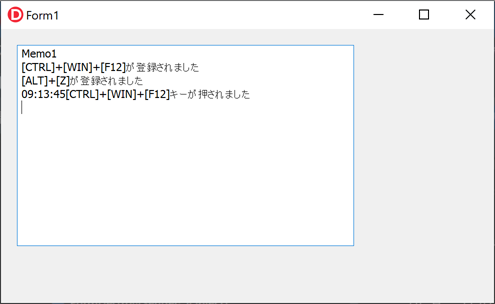
    Memo1.Lines.Add('[CTRL] + [WIN] + [F12] has been registered.');
  end
  else
  begin
    //Registration failed
    Memo1.Lines.Add('Failed: [CTRL] + [WIN] + [F12] is already registered by another application.');
    FHotKeyID1:=0;
  end;

  //Register hotkey: [ALT] + [Z]
  res:=RegisterHotkey(Handle, FHotKeyID2, MOD_ALT, Ord('Z'));
  if res then
  begin
    //[ALT] + [Z] has been registered.
    Memo1.Lines.Add('[ALT] + [Z] has been registered.');
  end
  else
  begin
    //Registration failed
    Memo1.Lines.Add('Failed: [ALT] + [Z] is already registered by another application.');
    FHotKeyID2:=0;
  end;
end;

procedure TForm1.FormDestroy(Sender: TObject);
begin
    // For DLLs, delete the atom strings:
  //   Example: GlobalDeleteAtom(FHotKeyID1);
  //   Example: GlobalDeleteAtom(FHotKeyID2);

  //Unregister hotkeys
  if FHotKeyID1 <> 0 then
    UnregisterHotKey(Self.Handle,FHotKeyID1);
  if FHotKeyID2 <> 0 then
    UnregisterHotKey(Self.Handle,FHotKeyID2);
end;

procedure TForm1.WMHotKey(var Message: TMessage);
begin
  //Unregister hotkeys

  //Restore the window if it is minimized
  if Self.WindowState=TWindowState.wsMinimized then
  begin
    Self.WindowState:=TWindowState.wsNormal;
  end;
  //Bring the window to the foreground
  SetForegroundWindow(Self.Handle);
  //Move the window to the top
  SetWindowPos(Self.Handle, HWND_TOP,0,0,0,0,SWP_NOMOVE+SWP_NOSIZE);

  if Message.WParam=FHotKeyID1 then
  begin
    Memo1.Lines.Add(
      FormatDateTime('hh:nn:ss',Now)+
      ' [CTRL] + [WIN] + [F12] was pressed.'
    );
  end
  else if Message.WParam=FHotKeyID2 then
  begin
    Memo1.Lines.Add(
      FormatDateTime('hh:nn:ss',Now)+
      ' [CTRL] + [WIN] + [F12] was pressed.'
    );
  end;
end;

end.
Running the Application
Run the program from “Run” → “Run”.
The project will be compiled automatically, the executable will be generated, and the application will start.
Minimize the application window or click on the desktop so that the application becomes inactive.
While the application is inactive, press [ALT] + [Z] or [CTRL] + [WIN] + [F12] on the keyboard.
The application will automatically become active, move to the front, and display which hotkey was pressed.