Retrieving Process Lists and Forcibly Terminating Processes — Delphi Source Code Collection
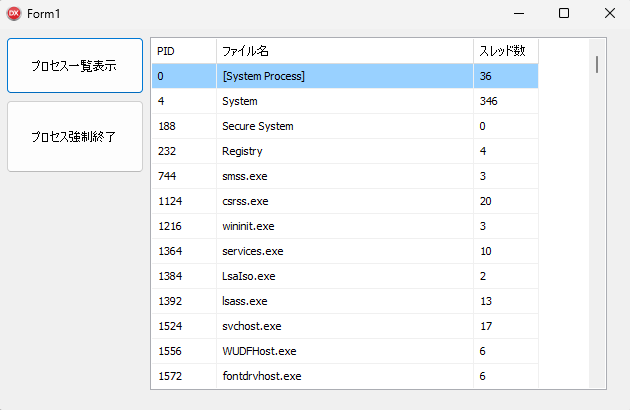
This article explains how to retrieve and display a list of running processes in Delphi using the
QueryFullProcessImageNameW API, and how to forcibly terminate a selected process ID using the
TerminateProcess API, complete with sample source code.
Form Design
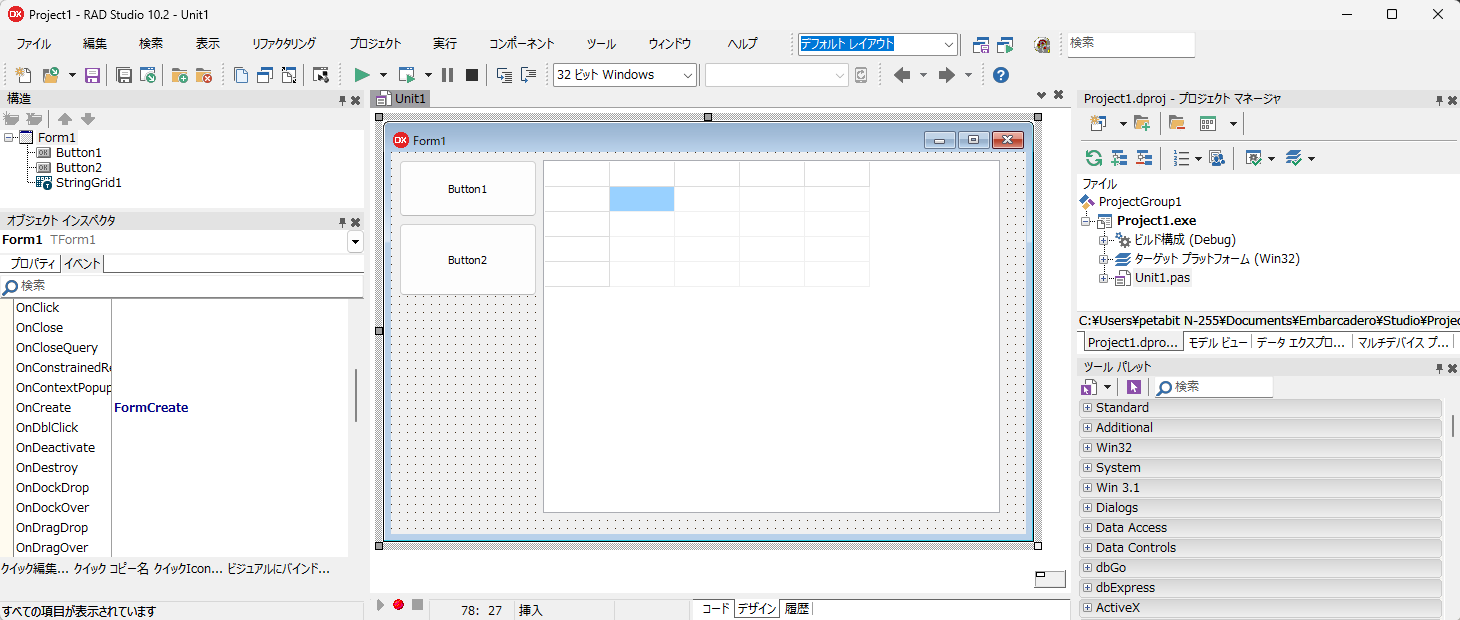
In the IDE, create a new project by selecting File → New → VCL Forms Application – Delphi.
Drag and drop two TButton components and one TStringGrid component onto the form.
Source Code
After pasting the source code below, open the Object Inspector in the design view and assign the following events:
Form1.OnCreate -> FormCreate
Button1.OnClick -> Button1Click
Button2.OnClick -> Button2Click
unit Unit1;

interface

uses
  Winapi.Windows, Winapi.Messages, System.SysUtils, System.Variants, System.Classes,
  Vcl.Graphics, Vcl.Controls, Vcl.Forms, Vcl.Dialogs, Vcl.StdCtrls, Vcl.Grids;

type
  TForm1 = class(TForm)
    Button1: TButton;
    Button2: TButton;
    StringGrid1: TStringGrid;
    procedure Button1Click(Sender: TObject);
    procedure Button2Click(Sender: TObject);
    procedure FormCreate(Sender: TObject);
  private
    { Private declarations }
    // Retrieve process list
    procedure GetProcessList(StrGrid: TStringGrid);
  public
    { Public declarations }
  end;

function QueryFullProcessImageNameW(
  hProcess   : THandle;
  dwFlags    : DWORD;
  lpExeName  : PWideChar;
  var dwSize : DWORD
): BOOL; stdcall; external kernel32 name 'QueryFullProcessImageNameW';

function QueryFullProcessImageNameA(
  hProcess: THandle;
  dwFlags: DWORD;
  lpExeName: PAnsiChar;
  var lpdwSize: DWORD
): BOOL; stdcall; external kernel32 name 'QueryFullProcessImageNameA';


var
  Form1: TForm1;

const
  PROCESS_QUERY_LIMITED_INFORMATION=$1000;
  LVM_FIRST     = $1000;
  LVM_GETHEADER = LVM_FIRST + 31;

implementation

{$R *.dfm}

uses Winapi.TlHelp32;

procedure TForm1.Button1Click(Sender: TObject);
begin
  // Retrieve process list
  GetProcessList(StringGrid1);
end;

procedure TForm1.Button2Click(Sender: TObject);
var
  ProcessID   : DWORD;
  hProcHandle : THandle;
begin
  // Do nothing if no row is selected
  if StringGrid1.Row < 1 then exit;
  if Trim(StringGrid1.Cells[0,StringGrid1.Row])='' then exit;
  // Process ID of the selected row
  ProcessID := StrToInt(StringGrid1.Cells[0,StringGrid1.Row]);

  //Confirm before terminating the process
  if Application.MessageBox(
      PChar('Forcefully terminate process ID '+IntToStr(ProcessID)+'?'),
      'Confirmation',MB_OKCANCEL
      )<>ID_OK then exit;

  // Open the process to obtain a handle for termination
  hProcHandle := OpenProcess(PROCESS_TERMINATE, False, ProcessID);
  try
    //Terminate the process
    TerminateProcess(hProcHandle, 0);
  finally
    //Close the handle
    CloseHandle(hProcHandle);
  end;
  //Refresh process list
  GetProcessList(StringGrid1);
end;


procedure TForm1.FormCreate(Sender: TObject);
begin
  StringGrid1.RowCount:=2;
  StringGrid1.ColCount:=3;
  StringGrid1.Rows[0].CommaText:='PID,File Name,Thread Count';
  StringGrid1.FixedCols:=0;
  StringGrid1.FixedRows:=1;
  StringGrid1.ColWidths[0]:=64;
  StringGrid1.ColWidths[1]:=256;
  StringGrid1.ColWidths[2]:=64;
  StringGrid1.Options:=StringGrid1.Options+[TGridOption.goRowSelect];

  Button1.Caption:='Show Process List';
  Button2.Caption:='Force Terminate Process';
end;

procedure TForm1.GetProcessList(StrGrid: TStringGrid);
var
  hSnapShot: THandle;
  ProcEntry: TProcessEntry32;
  hProcHandle : THandle;
  Buff        : array[0..MAX_PATH-1] of Char;
  STR_SIZE    : DWORD;
  fullpath:String;
  Count:Integer;
begin
  Count:=1;
  // TH32CS_SNAPPROCESS: include all processes in the snapshot
  // 0: include the current process as well (process ID to include in the snapshot)
  hSnapShot := CreateToolHelp32Snapshot(TH32CS_SNAPPROCESS, 0);
  if hSnapShot = INVALID_HANDLE_VALUE then Exit;
  ProcEntry.dwSize := SizeOf(ProcEntry);
  if Process32First(hSnapShot, ProcEntry) then
  begin
    repeat
      //Open the process using its process ID to obtain a handle
      hProcHandle := OpenProcess(
        PROCESS_QUERY_LIMITED_INFORMATION, False, ProcEntry.th32ProcessID
      );
      try
        STR_SIZE := Length(Buff);
        fullpath:='';
        if QueryFullProcessImageNameW(hProcHandle,0,PWideChar(@Buff),STR_SIZE) then
        begin
          fullpath:=String(Buff);
        end;
      finally
        CloseHandle(hProcHandle);
      end;
      StrGrid.RowCount:=Count+1;
      StrGrid.Cells[0,Count]:=IntToStr(ProcEntry.th32ProcessID);
      if fullpath='' then
      begin
        StrGrid.Cells[1,Count]:=ProcEntry.szExeFile;
      end
      else
      begin
        StrGrid.Cells[1,Count]:=fullpath;
      end;
      StrGrid.Cells[2,Count]:=IntToStr(ProcEntry.cntThreads);
      inc(Count);
    until not Process32Next(hSnapShot, ProcEntry);
  end;
  CloseHandle(hSnapShot);
end;

end.
Execution
To run the application, select Run -> Run from the IDE. The project will be compiled and executed.
Clicking Button1 displays the list of running processes, and selecting a process in StringGrid1 and clicking Button2 will forcibly terminate the selected process.