Sending Ping Requests in Delphi (IcmpSendEcho API)
This page shows how to create a Delphi application that sends ICMP ping requests — including custom payload sizes, optional DF (Don’t Fragment) flags, and operation without administrator privileges.
UI Layout
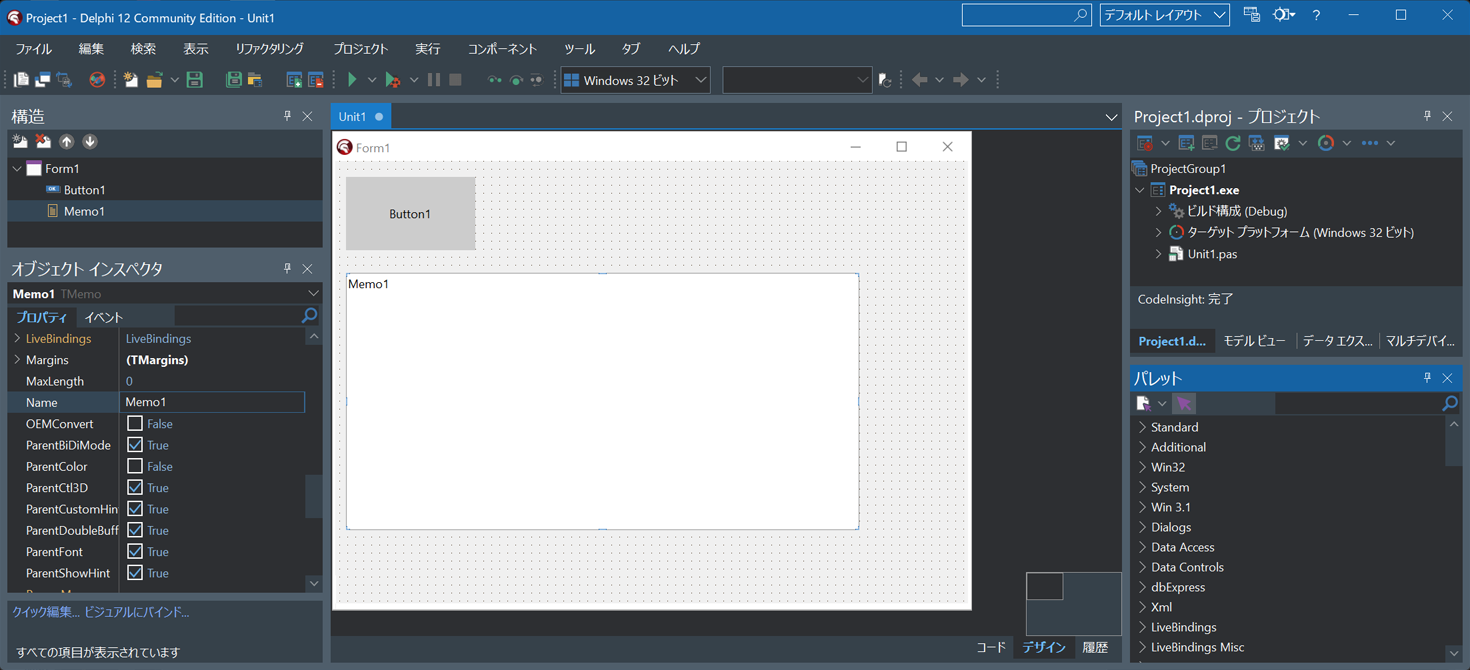
Start Delphi and select "File" -> "New" -> "Windows VCL Application".
Drag and drop one TButton and one TMemo onto the form.
Then select "File" -> "Save All" to create a project folder and save the unit and project files.
Creating the IcmpApi.pas Unit
Select "File" -> "New" -> "Unit – Delphi" to create a new unit, then copy and paste the following source code.
Choose "File" -> "Save As" and save the file as IcmpApi.pas.
unit IcmpApi;

interface

uses
  WinApi.Windows, System.SysUtils, WinApi.Winsock;

type

  TPingResult = record
    Address: string;        // Source IP address (string)
    Status: Cardinal;       // Success / error code
    RoundTripTime: Cardinal;// Round-trip time (ms)
    DataSize: Word;         // Size of returned data
    Ttl: Byte;              // TTL value
  end;

  IPAddr = ULONG;

  IP_OPTION_INFORMATION = record
    Ttl: UCHAR;
    Tos: UCHAR;
    Flags: UCHAR;
    OptionsSize: UCHAR;
    OptionsData: PUCHAR;
  end;
  PIP_OPTION_INFORMATION = ^IP_OPTION_INFORMATION;

  ICMP_ECHO_REPLY = record
    Address: IPAddr;                  // Source IP address
    Status: ULONG;                    // Success / error code
    RoundTripTime: ULONG;             // Round-trip time (ms)
    DataSize: WORD;                   // Size of returned data
    Reserved: WORD;                   // Reserved
    Data: Pointer;                    // Pointer to returned data
    Options: IP_OPTION_INFORMATION;   // IP option information
  end;
  PICMP_ECHO_REPLY = ^ICMP_ECHO_REPLY;

  PIO_APC_ROUTINE = procedure(ApcContext: Pointer; IoStatusBlock: Pointer; Reserved: ULONG); stdcall;


function IcmpCreateFile: THandle; stdcall; external 'iphlpapi.dll';
function Icmp6CreateFile: THandle; stdcall; external 'iphlpapi.dll';
function IcmpCloseHandle(IcmpHandle: THandle): BOOL; stdcall; external 'iphlpapi.dll';
function IcmpSendEcho(
  IcmpHandle: THandle;
  DestinationAddress: IPAddr;
  RequestData: Pointer;
  RequestSize: WORD;
  RequestOptions: PIP_OPTION_INFORMATION;
  ReplyBuffer: Pointer;
  ReplySize: DWORD;
  Timeout: DWORD
): DWORD; stdcall; external 'iphlpapi.dll';
function IcmpParseReplies(
  ReplyBuffer: Pointer;
  ReplySize: DWORD
): DWORD; stdcall; external 'iphlpapi.dll';

function Ping(const Host:string; TimeoutMSec:Cardinal=3000;
  RequestSize:Word=32; DoNotFragment:Boolean=false):TPingResult;

const
  IP_SUCCESS                = 0;
  IP_BUF_TOO_SMALL          = 11001;  // Buffer too small
  IP_DEST_NET_UNREACHABLE   = 11002;  // Destination network unreachable
  IP_DEST_HOST_UNREACHABLE  = 11003;  // Destination host unreachable
  IP_DEST_PROT_UNREACHABLE  = 11004;  // Destination protocol unreachable
  IP_DEST_PORT_UNREACHABLE  = 11005;  // Destination port unreachable
  IP_NO_RESOURCES           = 11006;  // Insufficient resources
  IP_BAD_OPTION             = 11007;  // Invalid option
  IP_HW_ERROR               = 11008;  // Hardware error
  IP_PACKET_TOO_BIG         = 11009;  // Packet too large
  IP_REQ_TIMED_OUT          = 11010;  // Request timed out
  IP_BAD_REQ                = 11011;  // Invalid request
  IP_BAD_ROUTE              = 11012;  // Invalid route
  IP_TTL_EXPIRED_TRANSIT    = 11013;  // TTL expired in transit
  IP_TTL_EXPIRED_REASSEM    = 11014;  // TTL expired during reassembly
  IP_PARAM_PROBLEM          = 11015;  // Parameter problem
  IP_SOURCE_QUENCH          = 11016;  // Source quench
  IP_OPTION_TOO_BIG         = 11017;  // Option too large
  IP_BAD_DESTINATION        = 11018;  // Invalid destination
  IP_UNKNOWN_ERROR          = Cardinal($FFFFFFFF);


  IP_FLAG_DF = $02; // Don't Fragment
implementation


// Sends a ping request and returns the result.
//   Parameters: host name, timeout (ms), request data size (bytes), DF flag
//   Returns: TPingResult
function Ping(const Host:string; TimeoutMSec:Cardinal=3000;
  RequestSize:Word=32; DoNotFragment:Boolean=false): TPingResult;
var
  WSAData: TWSAData;
  HostEnt: PHostEnt;
  IcmpHandle: THandle;
  Options: IP_OPTION_INFORMATION;
  Reply: PICMP_ECHO_REPLY;
  InAddr:TInAddr;
  RequestData:array of Byte;
  ReplyBuffer: array of Byte;
  ReturnValue:Cardinal;
  i:Integer;
  Bt:Byte;
begin
  ZeroMemory(@Result,SizeOf(Result));

  WSAStartup($202, WSAData);
  HostEnt := gethostbyname(PAnsiChar(AnsiString(Host)));
  WSACleanup();
  if HostEnt = nil then
  begin
    Result.Status:=IP_BAD_DESTINATION;
    Exit();
  end
  else
  begin
    InAddr.S_addr:=PInAddr(HOSTEnt.h_addr_list^).S_addr;
  end;

  if RequestSize=0 then RequestSize:=32;
  SetLength(RequestData,RequestSize);
  Bt:=$61;
  for i := Low(RequestData) to High(RequestData) do
  begin
    RequestData[i]:=Bt;
    inc(Bt);
    if Bt>$7a then Bt:=$61;
  end;
  SetLength(ReplyBuffer, SizeOf(ICMP_ECHO_REPLY)+RequestSize+256);

  IcmpHandle := IcmpCreateFile;
  if IcmpHandle = INVALID_HANDLE_VALUE then
  begin
    Result.Status:=IP_UNKNOWN_ERROR;
    Exit();
  end;

  ZeroMemory(@Options, SizeOf(Options));
  Options.Ttl := 64; // TTL
  if DoNotFragment then
    Options.Flags := IP_FLAG_DF;//Set DF flag

  ReturnValue:=IcmpSendEcho(
       IcmpHandle, InAddr.S_addr,
       @RequestData[0], RequestSize, @Options,
       @ReplyBuffer[0], Length(ReplyBuffer), TimeoutMSec
  );

  if ReturnValue>0 then
  begin
    Reply := PICMP_ECHO_REPLY(@ReplyBuffer[0]);
    InAddr.S_addr:=Reply.Address;
    Result.Address:=String(inet_ntoa(InAddr));
    Result.Status:=Reply.Status;
    Result.RoundTripTime:=Reply.RoundTripTime;
    Result.DataSize:=Reply.DataSize;
    Result.Ttl:=Reply.Options.Ttl;
  end
  else
    Result.Status:=IP_REQ_TIMED_OUT;
  IcmpCloseHandle(IcmpHandle);
end;


end.
Writing the Source Code
Switch to the form designer of Unit1, then double‑click Button1 and enter the following source code.
Make sure the file IcmpApi.pas is placed in the same project folder.
unit Unit1;

interface

uses
  Winapi.Windows, Winapi.Messages, System.SysUtils, System.Variants, System.Classes, Vcl.Graphics,
  Vcl.Controls, Vcl.Forms, Vcl.Dialogs, Vcl.StdCtrls, IcmpApi;

type
  TForm1 = class(TForm)
    Button1: TButton;
    Memo1: TMemo;
    procedure Button1Click(Sender: TObject);
  private
    { Private declarations }
  public
    { Public declarations }
  end;

var
  Form1: TForm1;

implementation

{$R *.dfm}


procedure TForm1.Button1Click(Sender: TObject);
var Res:TPingResult; i:Integer;
begin
  res:=Ping('192.168.1.1'); //Specify any IP address here
  if res.Status=IP_SUCCESS then
  begin
    Memo1.Lines.Add(
      Format(
        '%s replied: bytes=%d time=%dms TTL=%d',
        [res.Address, res.DataSize, res.RoundTripTime, res.Ttl]
      )
    );
  end
  else
  begin
    Memo1.Lines.Add('Error:'+IntToStr(res.Status));
  end;
end;

end.
Running the Application
Click the Run button to compile and start the application.
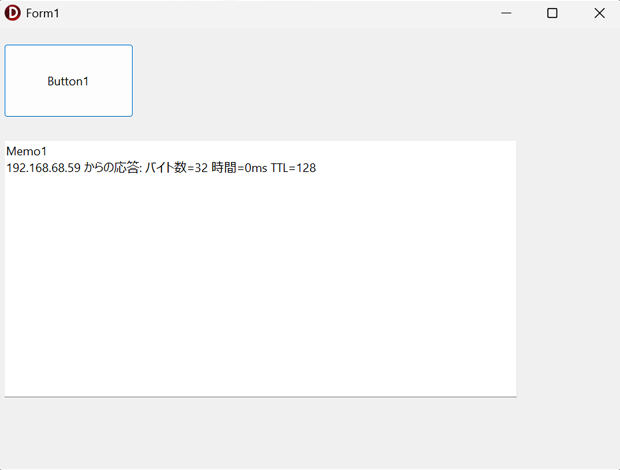
When you click Button1, a ping request is sent and the reply result is displayed in Memo1.