Retrieving the Display (Monitor) Scaling Settings in Windows — Delphi Source Code Collection
To retrieve the monitor scaling factor, use the Windows API function:
GetScaleFactorForMonitor(hMon: HMONITOR, scale: DEVICE_SCALE_FACTOR).
The number of monitors can be obtained with Screen.MonitorCount.
The handle for each monitor is:
Screen.Monitors[0 … Screen.MonitorCount - 1].Handle.
The monitor on which the application window is displayed (or the nearest one) can be retrieved using:
Screen.MonitorFromWindow(Self.Handle, TMonitorDefaultTo.mdNearest): TMonitor.
Creating the Project
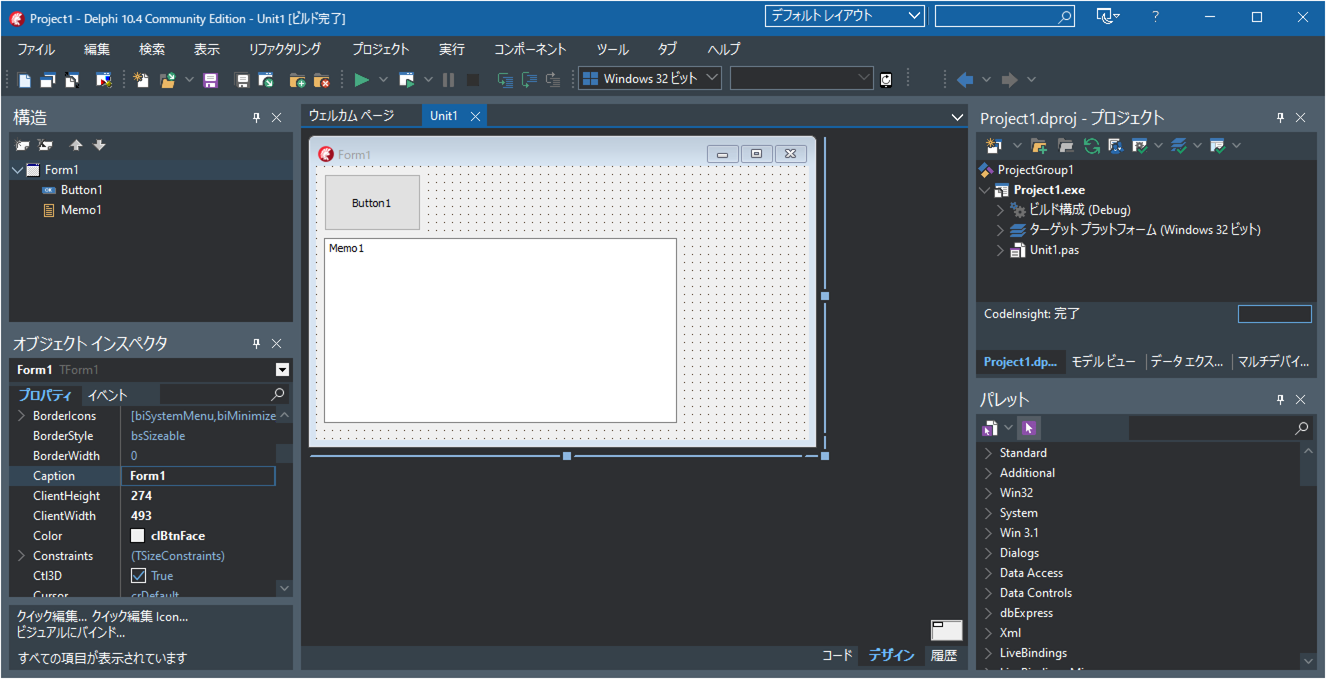
Launch the Delphi IDE and select "File" => "Windows VCL Application – Delphi".
Drag and drop one TButton and one TMemo onto the form.
Writing the Source Code
Double‑click Button1 and enter the following source code.
unit Unit1;

interface

uses
  Winapi.Windows, Winapi.Messages, System.SysUtils, System.Variants,
  System.Classes, Vcl.Graphics, Vcl.Controls, Vcl.Forms, Vcl.Dialogs,
  Vcl.StdCtrls, Winapi.ShellScaling, Winapi.ShlObj;

type
  TForm1 = class(TForm)
    Button1: TButton;
    Memo1: TMemo;
    procedure Button1Click(Sender: TObject);
  private
    { Private declarations }
    //This method is called when the DPI setting changes
    procedure DPIChanged(var msg:TMessage);message WM_DPICHANGED;
  public
    { Public declarations }
  end;

var
  Form1: TForm1;

implementation

{$R *.dfm}

procedure TForm1.Button1Click(Sender: TObject);
var i:Integer;
    mon:TMONITOR;
    dsf:DEVICE_SCALE_FACTOR;
begin
  Memo1.Clear;

  //Get the monitor where this application's window is displayed (nearest monitor)
  mon:=Screen.MonitorFromWindow(Self.Handle, TMonitorDefaultTo.mdNearest);
  //Retrieve the scaling factor of the monitor
  GetScaleFactorForMonitor(mon.Handle, dsf);
  Memo1.Lines.Add( Format('Monitor scaling: %d%%',[Ord(dsf)]) );

  //Retrieve the scaling factor of all monitors
  Memo1.Lines.Add('Number of monitors: '+IntToStr(Screen.MonitorCount));
  for i := 0 to Screen.MonitorCount-1 do
  begin
    GetScaleFactorForMonitor(Screen.Monitors[i].Handle, dsf);
    Memo1.Lines.Add(Format('  Monitor[%d] scaling: %d%%',[i+1, Ord(dsf)]));
  end;
end;

procedure TForm1.DPIChanged(var msg: TMessage);
var mon:TMONITOR;
    dsf:DEVICE_SCALE_FACTOR;
begin
  Memo1.Lines.Add('The monitor DPI setting has changed.');
  //Select the monitor where this application's window is displayed (nearest monitor)
  mon:=Screen.MonitorFromWindow(Self.Handle, TMonitorDefaultTo.mdNearest);
  //Retrieve the scaling factor of the monitor
  GetScaleFactorForMonitor(mon.Handle, dsf);
  Memo1.Lines.Add( Format('Monitor scaling: %d%%',[Ord(dsf)]) );
end;

end.
Running the Program
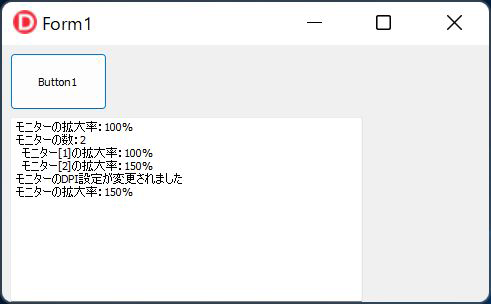
Click the Run button to compile and launch the application.
When you click Button1 or change the display scaling settings, the current scaling values will be shown in Memo1.