Retrieving Keyboard, Mouse, and Joystick Input
In shooting games and other game‑related programming, you often need to check timing using a TTimer or TApplicationEvents.OnIdle with functions such as (Winapi.MMSystem.)timeGetTime, timeBeginPeriod(1), timeEndPeriod(1), or QueryPerformanceFrequency(qpf) / QueryPerformanceCounter(qpc).
In real time, you must detect the current state of the keyboard (which keys are pressed), the mouse (cursor position and button states), and the joystick controller (stick position and button states).
(Reference) My free FMX software that retrieves joystick (gamepad) input:
Shooting Game NoTitle2
Create a New Delphi Project
Launch Delphi and select File → New → Windows VCL Application to create a new project.
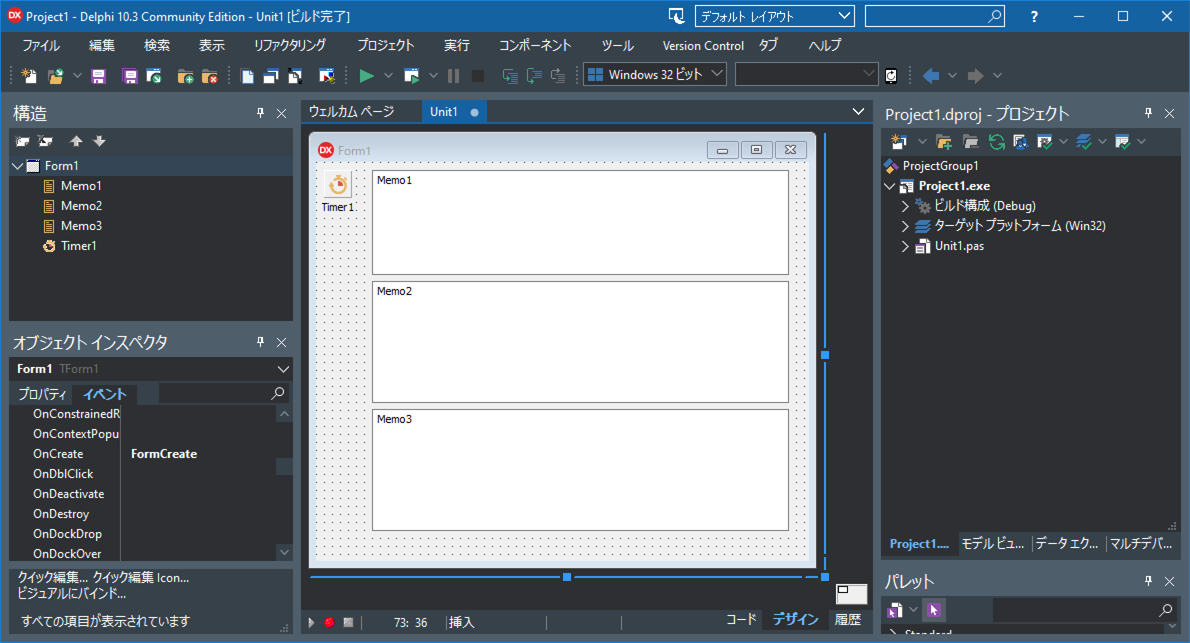
Drag and drop one TTimer and three TMemo components onto the form.
Click Save All to create the project folder and save the project and unit files.
Writing the Source Code
unit Unit1;

interface

uses
  Winapi.Windows, Winapi.Messages, System.SysUtils, System.Variants, System.Classes, Vcl.Graphics,
  Vcl.Controls, Vcl.Forms, Vcl.Dialogs, Vcl.StdCtrls, Vcl.ExtCtrls
  ,Winapi.MMSystem;

type
  TForm1 = class(TForm)
    Timer1: TTimer;
    Memo1: TMemo;
    Memo2: TMemo;
    Memo3: TMemo;
    procedure FormCreate(Sender: TObject);
    procedure Timer1Timer(Sender: TObject);
  private
    { Private declarations }
  public
    { Public declarations }
  end;

var
  Form1: TForm1;

implementation

{$R *.dfm}

procedure TForm1.FormCreate(Sender: TObject);
begin
  Timer1.Interval:=33;
  Timer1.Enabled:=True;
  Memo1.DoubleBuffered:=True;
  Memo2.DoubleBuffered:=True;
  Memo3.DoubleBuffered:=True;
end;

procedure TForm1.Timer1Timer(Sender: TObject);
var mp:TPoint;  //Mouse position
    mb:SmallInt;//Mouse button state
    sb:Integer; //Whether mouse buttons are swapped in OS settings
    k:SmallInt; //Keyboard key state
    ji: TJoyInfo;
begin
  memo1.Lines.BeginUpdate;
  memo2.Lines.BeginUpdate;
  memo3.Lines.BeginUpdate;

  memo1.Lines.Clear;
  memo2.Lines.Clear;
  memo3.Lines.Clear;
  //Current mouse position
    //Screen coordinates
    GetCursorPos(mp);
    Memo1.Lines.Add(
      'GetCursorPos (screen coordinates):'+Format('x=%4d,y=%4d',[mp.X,mp.Y])
    );
    //Convert to form coordinates
    mp:=self.ScreenToClient(mp);
    Memo1.Lines.Add(
      'Converted to form coordinates:'+Format('x=%4d,y=%4d',[mp.X,mp.Y])
    );

  //Physical mouse button states (ignores OS left/right swap)
    mb:=GetAsyncKeyState(VK_LBUTTON);
    if mb<0 then
      memo1.Lines.Add('GetAsyncKeyState(VK_LBUTTON):pressed')
    else
      memo1.Lines.Add('GetAsyncKeyState(VK_LBUTTON):not pressed');

    sb:=GetSystemMetrics(SM_SWAPBUTTON);
    if sb<>0 then
      memo1.Lines.Add('GetSystemMetrics(SM_SWAPBUTTON):mouse buttons swapped')
    else
      memo1.Lines.Add('GetSystemMetrics(SM_SWAPBUTTON):mouse buttons not swapped');


  //Keyboard key states
    k:=GetKeyState(ord('A'));
    if k<0 then
      Memo2.Lines.Add('A key:pressed)
    else
      Memo2.Lines.Add('A key:not pressed');
    k:=GetKeyState(VK_SHIFT);
    if k<0 then
      Memo2.Lines.Add('SHIFT key:pressed')
    else
      Memo2.Lines.Add('SHIFT key:not pressed');

    mb:=GetAsyncKeyState(VK_LSHIFT);
    if mb<0 then
      memo2.Lines.Add('GetAsyncKeyState(VK_LSHIFT):pressed')
    else
      memo2.Lines.Add('GetAsyncKeyState(VK_LSHIFT):not pressed');

    mb:=GetAsyncKeyState(VK_RSHIFT);
    if mb<0 then
      memo2.Lines.Add('GetAsyncKeyState(VK_RSHIFT):pressed')
    else
      memo2.Lines.Add('GetAsyncKeyState(VK_RSHIFT):not pressed');


  //■Joystick controller state
    if joyGetPos(JOYSTICKID1,@ji)=JOYERR_NOERROR then
    begin
      memo3.Lines.Add('JOYSTICKID1:connected');
      memo3.Lines.Add(
        'JOYSTICKID1:X='+Format('%5d',[ji.wXpos])
      );
      memo3.Lines.Add(
        'JOYSTICKID1:Y='+Format('%5d',[ji.wYpos])
      );
      if (ji.wButtons and JOY_BUTTON1)=JOY_BUTTON1 then
        memo3.Lines.Add('JOYSTICKID1:JOY_BUTTON1 pressed')
      else
        memo3.Lines.Add('JOYSTICKID1:JOY_BUTTON1 not pressed');

      if (ji.wButtons and JOY_BUTTON2)=JOY_BUTTON2 then
        memo3.Lines.Add('JOYSTICKID1:JOY_BUTTON2 pressed')
      else
        memo3.Lines.Add('JOYSTICKID1:JOY_BUTTON2 not pressed');
    end
    else
      memo3.Lines.Add('JOYSTICKID1:not connected');

    //ジョイスティック2
    if joyGetPos(JOYSTICKID2,@ji)=JOYERR_NOERROR then
    begin
      memo3.Lines.Add('JOYSTICKID2:接続されている');
      memo3.Lines.Add(
        'JOYSTICKID2:X='+Format('%5d',[ji.wXpos])
      );
      memo3.Lines.Add(
        'JOYSTICKID2:Y='+Format('%5d',[ji.wYpos])
      );
      if (ji.wButtons and JOY_BUTTON1)=JOY_BUTTON1 then
        memo3.Lines.Add('JOYSTICKID2:JOY_BUTTON1 pressed')
      else
        memo3.Lines.Add('JOYSTICKID2:JOY_BUTTON1 not pressed');

      if (ji.wButtons and JOY_BUTTON2)=JOY_BUTTON2 then
        memo3.Lines.Add('JOYSTICKID2:JOY_BUTTON2 pressed')
      else
        memo3.Lines.Add('JOYSTICKID2:JOY_BUTTON2 not pressed');
    end
    else
      memo3.Lines.Add('JOYSTICKID2:not connected');

  memo1.Lines.EndUpdate;
  memo2.Lines.EndUpdate;
  memo3.Lines.EndUpdate;
end;

end.
Run the Application
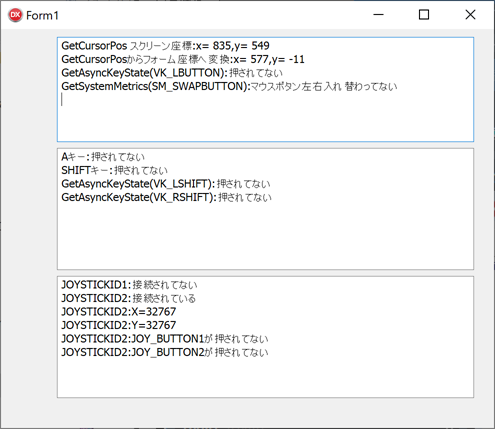
Execution screen: