Direct2D Canvas Rendering in Delphi: Controlling Anti-Aliasing and Alpha Blending
In Delphi’s VCL environment, achieving high‑quality Direct2D rendering requires proper control of anti‑aliasing and AlphaBlend (opacity) settings through TDirect2DCanvas.
This page explains how to enable or disable anti‑aliasing during canvas drawing, how to adjust transparency using AlphaBlend, and how to combine these techniques with TImage for bitmap output examples.
The techniques here are especially useful if you want to improve the rendering quality of RoundRect or line drawing.
Note that these features are available only on Windows 7 or later, and Delphi 2010 or later.
- Enable anti‑aliasing for non‑text and non‑glyph drawing
- TDirect2DCanvas.RenderTarget.SetAntialiasMode(D2D1_ANTIALIAS_MODE_PER_PRIMITIVE);
- Disable anti‑aliasing for non‑text and non‑glyph drawing
- TDirect2DCanvas.RenderTarget.SetAntialiasMode(D2D1_ANTIALIAS_MODE_ALIASED);
- Enable anti‑aliasing for text and glyph rendering
- TDirect2DCanvas.RenderTarget.SetTextAntialiasMode(D2D1_TEXT_ANTIALIAS_MODE_CLEARTYPE);
- Disable anti‑aliasing for text and glyph rendering
- TDirect2DCanvas.RenderTarget.SetTextAntialiasMode(D2D1_TEXT_ANTIALIAS_MODE_ALIASED);
Creating the Project and Designing the Form
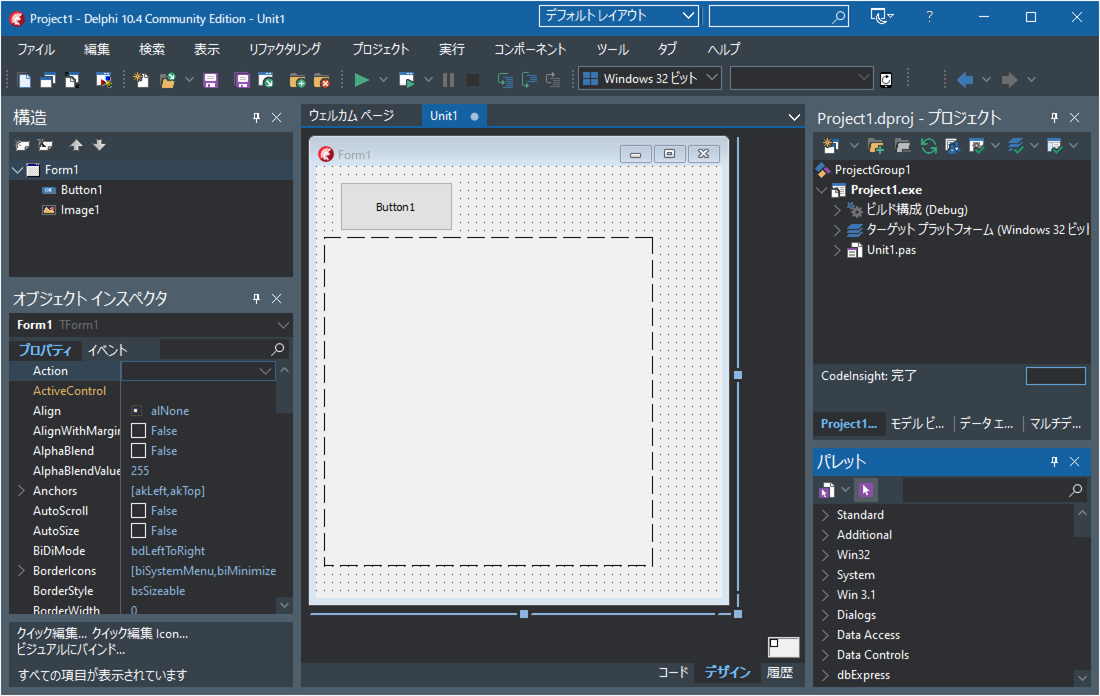
Create a new VCL application project, then place one TButton and one TImage on the form (Form1).
Writing the Source Code
Double‑click TButton1 and enter the following source code.
unit Unit1;

interface

uses
  Winapi.Windows, Winapi.Messages, System.SysUtils, System.Variants, System.Classes, Vcl.Graphics,
  Vcl.Controls, Vcl.Forms, Vcl.Dialogs, Vcl.ExtCtrls, Vcl.StdCtrls;

type
  TForm1 = class(TForm)
    Button1: TButton;
    Image1: TImage;
    procedure Button1Click(Sender: TObject);
  private
    { Private declarations }
  public
    { Public declarations }
  end;

var
  Form1: TForm1;

implementation

{$R *.dfm}

uses Vcl.Direct2D, Winapi.D2D1, System.Math, Vcl.Imaging.jpeg;

procedure TForm1.Button1Click(Sender: TObject);
var D2Canvas:TDirect2DCanvas;
    ptf:TD2DPoint2f;
    jpg:TJpegImage;
    D2D1SolidColorBrush:ID2D1SolidColorBrush;
    D2D1StrokeStyle:ID2D1StrokeStyle;
begin
  if not TDirect2DCanvas.Supported then
  begin
    ShowMessage('Direct2D is not available.');
    exit;
  end;

  //Set the size
  Image1.Width:=320;
  Image1.Height:=320;
  Image1.Picture.Bitmap.Width:=Image1.Width;
  Image1.Picture.Bitmap.Height:=Image1.Height;
  Image1.Picture.Bitmap.PixelFormat:=pf24bit;

  //Create the Direct2D canvas
  D2Canvas:=
    TDirect2DCanvas.Create(
      Image1.Picture.Bitmap.Canvas,
      Rect(
        0,0,
        Image1.Picture.Bitmap.Width,
        Image1.Picture.Bitmap.Height
      )
    );

  //Begin drawing
  D2Canvas.BeginDraw;


  //Brush settings
  D2Canvas.Brush.Color:=clWhite;
  D2Canvas.Brush.Style:=bsSolid;
  D2Canvas.Brush.Handle.SetOpacity(1);//100% opacity
  //ペンの設定
  D2Canvas.Pen.Color:=clBlue;
  D2Canvas.Pen.Style:=psSolid;
  D2Canvas.Pen.Width:=4;

  //Disable anti-aliasing
  D2Canvas.RenderTarget.SetAntialiasMode(D2D1_ANTIALIAS_MODE_ALIASED);


  //Draw a rectangle
  D2Canvas.Rectangle(
    0,0,
    Image1.Picture.Bitmap.Width,
    Image1.Picture.Bitmap.Height
  );


  //ブラシの設定
  D2Canvas.Brush.Color:=clYellow;
  D2Canvas.Brush.Handle.SetOpacity(0.5);//50% opacity
  //ペンの設定
  D2Canvas.Pen.Brush.Handle.SetOpacity(0.5);//50% opacity
  D2Canvas.Pen.Width:=12;


  //Draw lines
  //Enable anti-aliasingEnable anti-aliasing
  D2Canvas.RenderTarget.SetAntialiasMode(D2D1_ANTIALIAS_MODE_PER_PRIMITIVE);
  //Draw a line
  D2Canvas.MoveTo(0,0);
  D2Canvas.LineTo(
    100,
    Image1.Picture.Bitmap.Height-1
  );
  //Disable anti-aliasing
  D2Canvas.RenderTarget.SetAntialiasMode(D2D1_ANTIALIAS_MODE_ALIASED);
  //Draw another line
  D2Canvas.MoveTo(20,0);
  D2Canvas.LineTo(
    120,
    Image1.Picture.Bitmap.Height-1
  );


  //Draw a line using RenderTarget.DrawLine
  //青色の不透明度50%のブラシを「D2D1SolidColorBrush」に作成
  D2Canvas.RenderTarget.CreateSolidColorBrush(
    D2D1ColorF(clBlue, 0.5), nil, D2D1SolidColorBrush);
  //線の形状を「D2D1StrokeStyle」に作成
  D2DFactory.CreateStrokeStyle(
    D2D1StrokeStyleProperties(
      D2D1_CAP_STYLE_ROUND,    // Start cap (rounded)
      D2D1_CAP_STYLE_ROUND,    // End cap (rounded)
      D2D1_CAP_STYLE_TRIANGLE, // Dash cap (triangle)
      D2D1_LINE_JOIN_ROUND,    // Line join (rounded)
      10.0,                    // Miter limit
      D2D1_DASH_STYLE_DASH,    // Dashed line
      0
    ),
    nil,
    0,
    D2D1StrokeStyle
  );
  //Draw the line
  D2Canvas.RenderTarget.DrawLine(
    D2D1PointF(50,20),
    D2D1PointF(130,Image1.Picture.Bitmap.Height-56),
    D2D1SolidColorBrush,
    12,
    D2D1StrokeStyle
  );


  //Draw rounded rectangles
  //Enable anti-aliasing
  D2Canvas.RenderTarget.SetAntialiasMode(D2D1_ANTIALIAS_MODE_PER_PRIMITIVE);
  D2Canvas.RoundRect(
    Rect(180,100,280,140),
    8,8
  );
  //Disable anti-aliasing
  D2Canvas.RenderTarget.SetAntialiasMode(D2D1_ANTIALIAS_MODE_ALIASED);
  D2Canvas.RoundRect(
    Rect(200,120,300,160),
    8,8
  );


  //Draw ellipses
  //Enable anti-aliasing
  D2Canvas.RenderTarget.SetAntialiasMode(D2D1_ANTIALIAS_MODE_PER_PRIMITIVE);
  //Disable anti-aliasing
  D2Canvas.RenderTarget.SetAntialiasMode(D2D1_ANTIALIAS_MODE_ALIASED);
  D2Canvas.Ellipse(200,200,280,300);


  //Draw text
  //Enable text anti-aliasing
  D2Canvas.RenderTarget.SetTextAntialiasMode(D2D1_TEXT_ANTIALIAS_MODE_CLEARTYPE);
  //Transparent brush
  D2Canvas.Brush.Style:=bsClear;
  //Font settings
  D2Canvas.Font.Brush.Handle.SetOpacity(0.7);
  D2Canvas.Font.Size:=24;  //(pt)
  ptf.x:=40;
  ptf.y:=160;
  //Apply a 30-degree rotation transform
  D2Canvas.RenderTarget.SetTransform(TD2DMatrix3x2F.Rotation(30,ptf));
  //Draw text
  D2Canvas.TextOut(trunc(ptf.x),trunc(ptf.y),'Text');
  //Disable text anti-aliasing
  D2Canvas.RenderTarget.SetTextAntialiasMode(D2D1_TEXT_ANTIALIAS_MODE_ALIASED);
  //Reset transform
  D2Canvas.RenderTarget.SetTransform(TD2DMatrix3x2F.Rotation(0,ptf));
  //Draw text again
  D2Canvas.TextOut(trunc(ptf.x),trunc(ptf.y),'Text');


  //Draw a JPEG image (prepare test.jpg beforehand)
  //Enable anti-aliasing
  D2Canvas.RenderTarget.SetAntialiasMode(D2D1_ANTIALIAS_MODE_PER_PRIMITIVE);
  jpg:=TJPEGImage.Create;
  try
    jpg.LoadFromFile('..\..\test.jpg');
    ptf.x:=200;
    ptf.y:=10;
    //Apply a 20-degree rotation transform
    D2Canvas.RenderTarget.SetTransform(TD2DMatrix3x2F.Rotation(20,ptf));
    D2Canvas.StretchDraw(
      Rect(
        trunc(ptf.x),trunc(ptf.y),
        trunc(ptf.x)+80,trunc(ptf.y+80*jpg.Height/jpg.Width)
      ),
      jpg,
      180 //opacity (0–255)
    );
    //Reset transform
    D2Canvas.RenderTarget.SetTransform(TD2DMatrix3x2F.Rotation(0,ptf));

  finally
    jpg.Free;
  end;


  //End drawing
  D2Canvas.EndDraw;

  //Free the Direct2D canvas
  D2Canvas.Free;
end;

end.
Running the Program
Click the Run button to execute the application (running in debug mode is also fine).
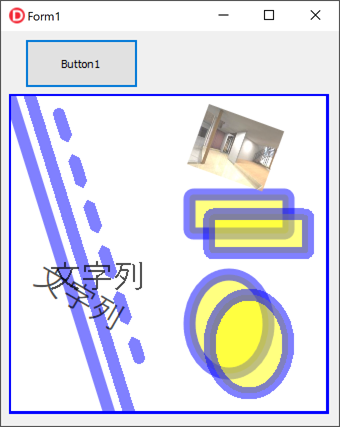
When you click Button1, the program fills the background of Image1.Picture.Bitmap and draws lines, rounded rectangles, ellipses, text, and a JPEG image.
You can clearly see the difference between smooth and jagged edges depending on whether anti‑aliasing is enabled or disabled.