
ファイルのアップロードWEBアプリCGIの作成 ~Delphiソースコード集
Apache(又はIIS)+DelphiでCGIを作成してファイルアップロードWEBアプリケーションを作成する
libeay32.dll、ssleay32.dllファイルの入手
https://indy.fulgan.com/SSL/等からOpenSSLファイルをダウンロードし、解凍してlibeay32.dll、ssleay32.dllファイルを、 パスの通った場所(c:\windows等)又は今から作成するプログラムと同じ位置に配置します。
(Bit数は合わせる必要があります。 Delphiで32Bitコンパイルでビルトする場合は32BitのOpenSSLをダウンロードします。)
Delphiを起動して新規作成を行う
Delphiを起動し、ファイル→新規作成→その他・・・をクリックします。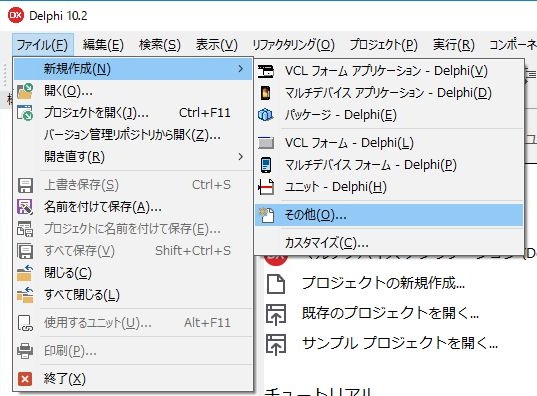
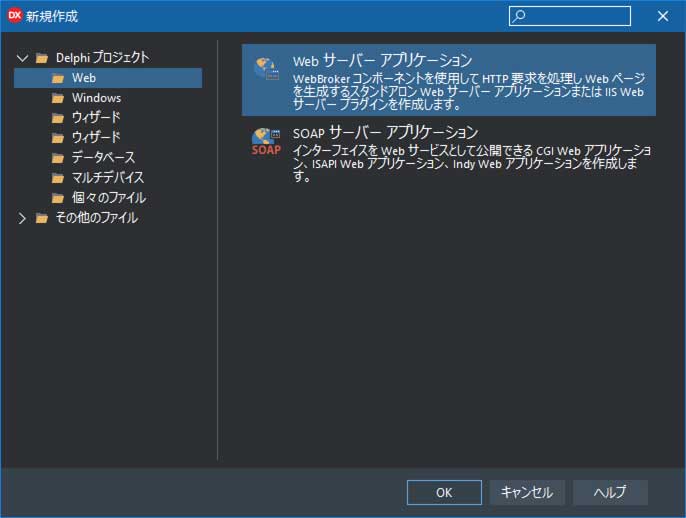
左ペインの「Web」を選択し、右ペインの「Webサーバーアプリケーション」をクリックし「OK」ボタンをクリックします。
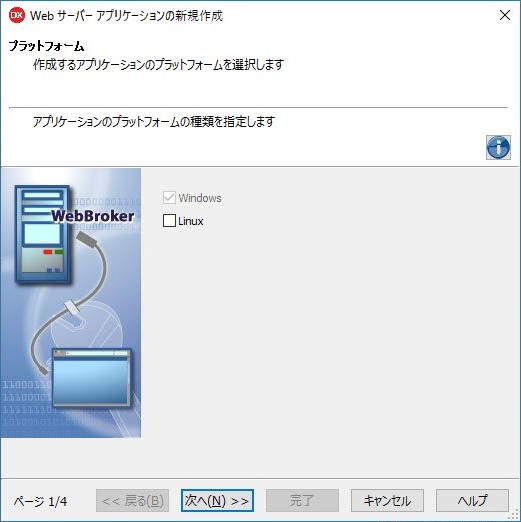
「次へ」をクリックします。
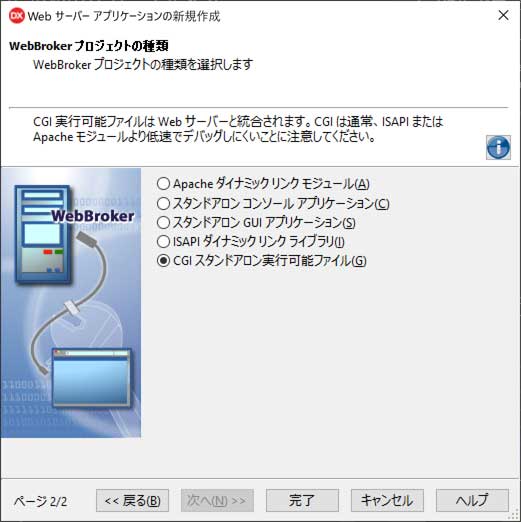
今回は「CGIスタンドアロン実行可能ファイル」を選択します。IISやApacheでCGIとして動作させることができます。完了ボタンをクリックします。
すべて保存(SHIFT+CTRL+S)を押してフォルダを作成し、 ユニットをデフォルトの「WebModuleUnit1.pas」で保存し、
プロジェクトを「fileupload.dproj」で保存します。
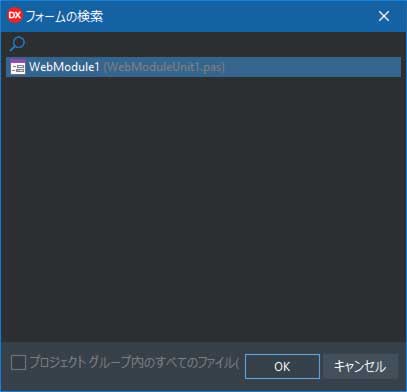
Shift+F12を押してフォームの一覧を表示します。
WebMobule1(WebMobuleUni1.pas)を選択してOKボタンをクリックします。
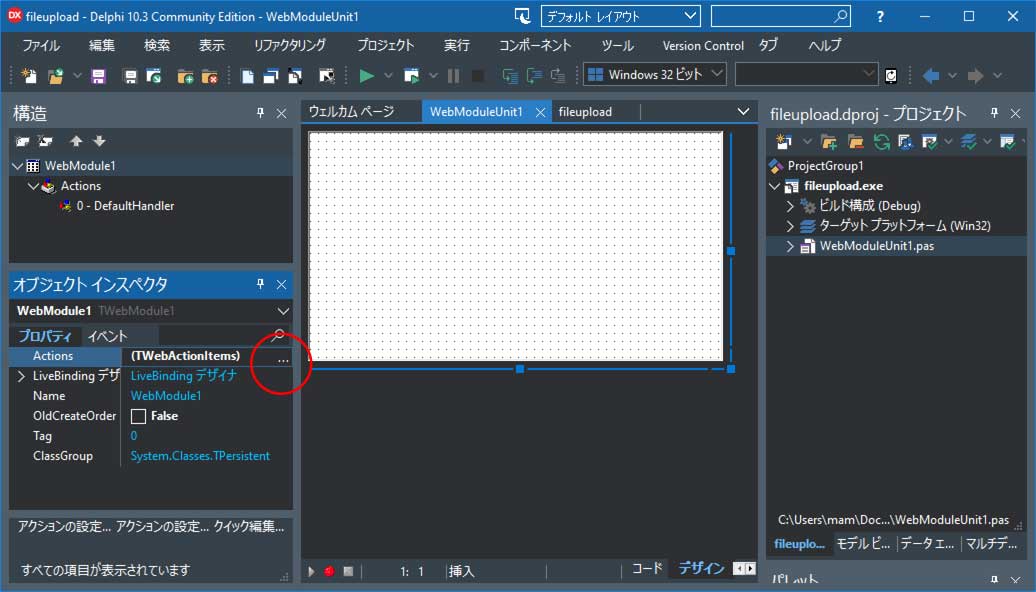
左下ペインのオブジェクトインスペクタの「Actions」の右にある「・・・」ボタンをクリックします。
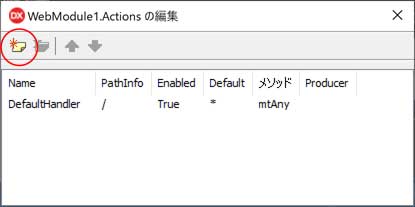
左にある「新規追加」ボタンをクリックします。
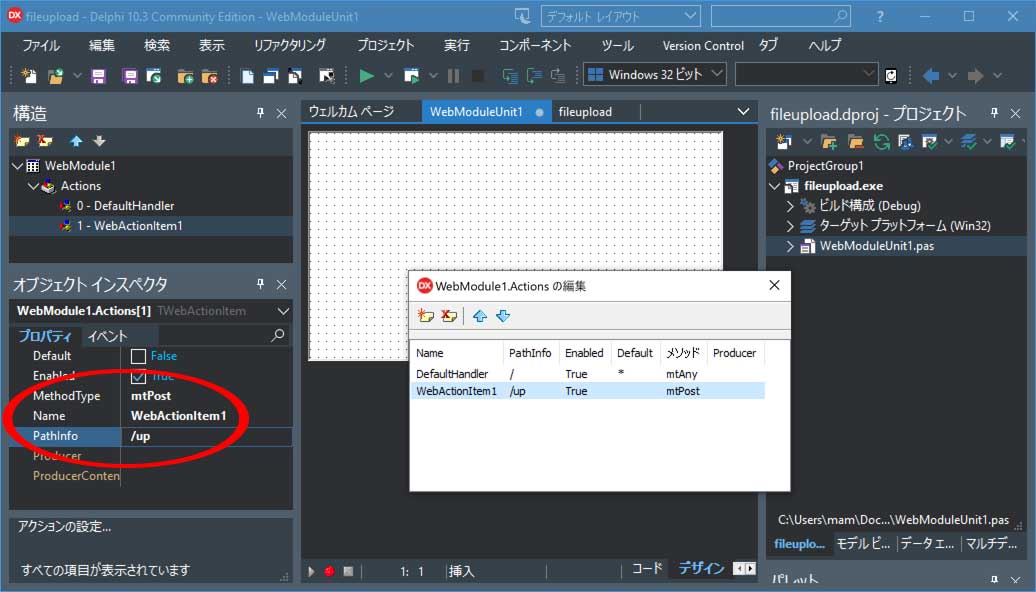
WebActionItem1が選択されている状態で、以下プロパティを設定します。
MethodType を「mtPost」
PathInfo を 「/up」
に設定します。
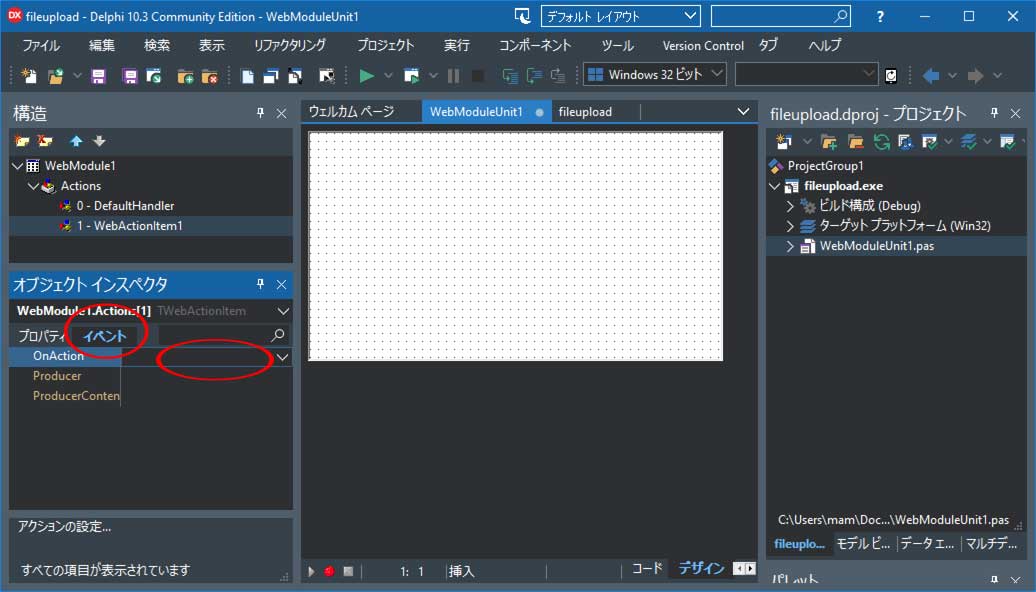
「イベント」タブをクリックし、[OnAction]の右側の何もないところをダブルクリックします。
ソースコードの記述
以下ソースコードを記述する
unit WebModuleUnit1;

interface

uses
  System.SysUtils, System.Classes, Web.HTTPApp;

type
  TWebModule1 = class(TWebModule)
    procedure WebModule1DefaultHandlerAction(Sender: TObject;
      Request: TWebRequest; Response: TWebResponse; var Handled: Boolean);
    procedure WebModule1WebActionItem1Action(Sender: TObject;
      Request: TWebRequest; Response: TWebResponse; var Handled: Boolean);
  private
    { private 宣言 }
  public
    { public 宣言 }
  end;

var
  WebModuleClass: TComponentClass = TWebModule1;

implementation

{%CLASSGROUP 'System.Classes.TPersistent'}

{$R *.dfm}

//マルチパートフォームを扱う場合は、usesにReqMultiが必要
//有効ファイル名確認(TPath.HasValidPathChars)でusesにIOUtilsを追加
uses ReqMulti,IOUtils;

procedure TWebModule1.WebModule1DefaultHandlerAction(Sender: TObject;
  Request: TWebRequest; Response: TWebResponse; var Handled: Boolean);
begin
  Response.ContentType:='text/html;charset=UTF-8';
  Response.Content :=
    '<html>' +
    '<head>'+
    '<meta name="viewport" content="width=device-width,initial-scale=1">'+
    '  <meta http-equiv="Content-Type" content="text/html; charset=utf-8"/>'+
    '  <title>Webサーバーアプリケーション(ファイルのアップロード)</title>'+
    '</head>' +
    '<body>'+
    '<h3>Web サーバー アプリケーション(ファイルのアップロード)</h3>'+
    '  <form action="/cgi-bin/'+ ExtractFileName(ParamStr(0)) +'/up" '+
    '        method="post" enctype="multipart/form-data">'+
    '    ファイル1:<input type="file" name="upload_file_name1"><br>'+
    '    ファイル2:<input type="file" name="upload_file_name2"><br>'+
    '    ファイル3:<input type="file" name="upload_file_name3"><br>'+
    '    <br>'+
    '    <input type="submit" value="サーバーへ送信">'+
    '  </form>'+
    '</body>' +
    '</html>';
end;

procedure TWebModule1.WebModule1WebActionItem1Action(Sender: TObject;
  Request: TWebRequest; Response: TWebResponse; var Handled: Boolean);
const
    MaxFileCount:Integer=3;//upload_file_name* の最大値
var
    //汎用
    i,j:integer;
    //一時的にファイルをストリームに保存する
    strm:array of TMemoryStream;
    //ファイル名一覧
    fname:array of string;
    err:TStringList;
    fno:integer;
begin
  err:=TStringList.Create;
  SetLength(strm,MaxFileCount);
  SetLength(fname,MaxFileCount);
  for i := 0 to MaxFileCount-1 do
  begin
    strm[i]:=TMemoryStream.Create;
    fname[i]:='';
    err.Add('');
  end;

  if Request.Files.Count>0 then
  begin
    for i := 0 to Request.Files.Count-1 do
    begin
      fno:=0;
      //<input type="file" name="">タグのname属性確認
      for j := 1 to MaxFileCount do
        if Request.Files[i].FieldName=('upload_file_name'+trim(inttostr(j))) then
          fno:=j;
      if fno>0 then
      begin
        //アップロードファイル1のファイル名が有効か
        if not TPath.HasValidPathChars(Request.Files[i].FileName,false) then
          err[fno-1]:='<p>ファイル'+inttostr(fno)+'のファイル名が無効です</p>'
        else
        begin
          //アップロードファイルをストリームに保存
          Request.Files[i].Stream.Position:=0;
          strm[fno-1].Clear;
          strm[fno-1].LoadFromStream(Request.Files[i].Stream);
          fname[fno-1]:=Request.Files[i].FileName;
          err[fno-1]:='<p>ファイル'+inttostr(fno)+
                      '['+fname[fno-1]+']アップロード完了</p>';
        end;
      end;
    end;
  end
  else
  begin
    err[0]:='<p>ファイルを選択してから「サーバーへ送信」ボタンを押してください</p>';
  end;

  //ストリームをファイルに保存
  for i := 0 to MaxFileCount-1 do
  begin
    if fname[i]<>'' then
    begin
      //ファイル保存先フォルダ名は適宜設定
      if not DirectoryExists('c:\upload_files') then
        CreateDir('c:\upload_files');
      strm[i].SaveToFile('c:\upload_files\'+fname[i]);
    end;
  end;

  //レスポンス設定
  Response.ContentType:='text/html;charset=UTF-8';
  Response.Content :=
    '<html>' +
    '<head>'+
    '<meta name="viewport" content="width=device-width,initial-scale=1">'+
    '  <meta http-equiv="Content-Type" content="text/html; charset=utf-8"/>'+
    '  <title>Webサーバーアプリケーション(ファイルのアップロード完了画面)</title>'+
    '</head>' +
    '<body>'+
    '<h3>Web サーバー アプリケーション(完了画面)</h3>';
  for i := 0 to MaxFileCount-1 do
    Response.Content :=Response.Content +err[i];
  Response.Content :=Response.Content+
    '  <a href="/cgi-bin/'+ExtractFileName(ParamStr(0))+'">戻る</a><br>'+
    '</body></html>';

  //オブジェクトの破棄
  for i:= 0 to MaxFileCount-1 do strm[i].Free;
  err.Free;
end;

end.
リリース ビルドに切り替える
IDE右上の「プロジェクト」ペインの fileupload.exeのビルド構成の[Release]をダブルクリックします。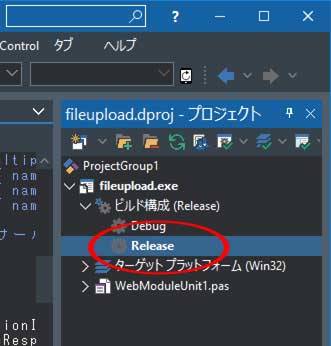
コンパイルする
メニューバーの「プロジェクト」⇒「すべてのプロジェクトをビルト」をクリックします。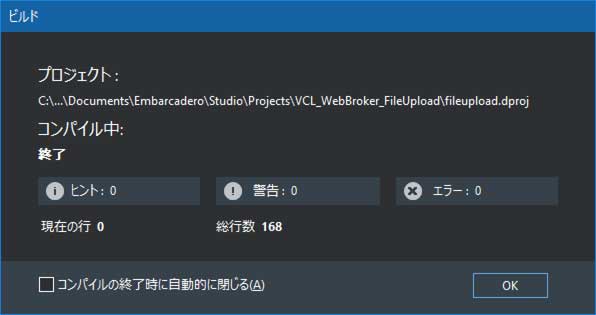
「cgi-bin」フォルダにコンパイルした「chat.exe」ファイルを配置する
C:\Users\[ユーザー名]\Documents\Embarcadero\Studio\Projects\[プロジェクト保存フォルダ]\Win32\Releaseにあるファイル fileupload.exe を、
C:\Apache24\cgi-bin
等のApacheの cgi-bin フォルダにコピーします。(IISの場合は scripts フォルダ)
必要であれば、fileupload.exe ファイルを右クリックしてプロパティ⇒セキュリティタブから、 Apache(又はIIS)を起動している ユーザーを追加して「読み取りと実行」権限を与えます。
ブラウザを起動して実行してみる
ブラウザを起動してURLにhttp://localhost/cgi-bin/fileupload.exe
と入力してEnterキーを押します。
(SSLが有効な場合は https://localhost/cgi-bin/fileupload.exe)
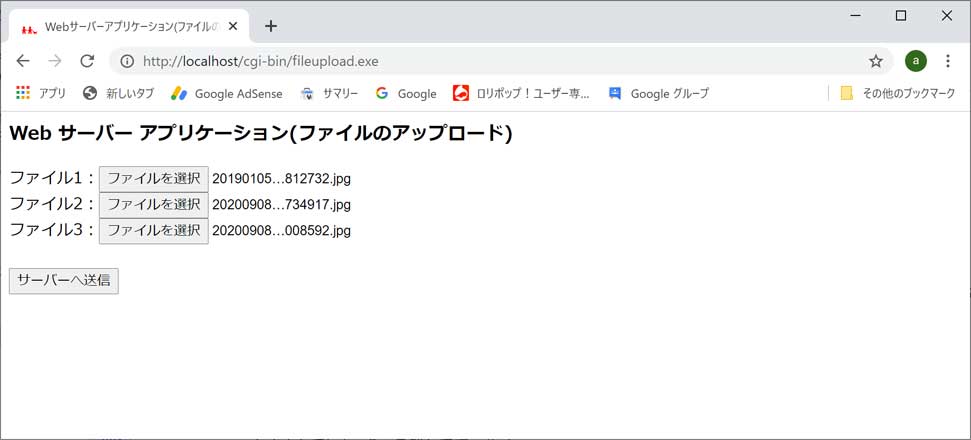
ファイルを設定して、「サーバーへ送信」ボタンをクリックすると「c:\upload_files」フォルダに ファイルがアップロードされます。
Delphiでファイルをアップロードするプログラムを作成する
DelphiでApacheのcgi用プログラムでファイルのアップロード受信サーバーができましたが、 ブラウザを利用せずにDephiでhttp通信してファイルをアップロードするアプリケーションを作成します。1.[ファイル]⇒[新規作成]⇒[Windows VCL アプリケーション -Delphi]をクリックします。
2.フォームに「TIdHTTP」と「TButton」と「TMemo」をドラッグ&ドロップします。
3.Button1をダブルクリックしてソースを記述します。
unit Unit1;

interface

uses
  Winapi.Windows, Winapi.Messages, System.SysUtils, System.Variants, System.Classes, Vcl.Graphics,
  Vcl.Controls, Vcl.Forms, Vcl.Dialogs, Vcl.StdCtrls, IdBaseComponent,
  IdComponent, IdTCPConnection, IdTCPClient, IdHTTP;

type
  TForm1 = class(TForm)
    IdHTTP1: TIdHTTP;
    Button1: TButton;
    Memo1: TMemo;
    procedure Button1Click(Sender: TObject);
  private
    { Private 宣言 }
  public
    { Public 宣言 }
  end;

var
  Form1: TForm1;

implementation

{$R *.dfm}

uses IdMultipartFormData,IdGlobal;

procedure TForm1.Button1Click(Sender: TObject);
var data:TIdMultipartFormDataStream;
    strm:TStringStream;
begin
  data:=TIdMultiPartFormDataStream.Create;

  //            name属性          ,ファイルフルパス,コンテンツタイプ
  data.AddFile('upload_file_name1','a.jpg','application/octed-stream');
  //複数のファイルを一度にアップロードする場合
  data.AddFile('upload_file_name2','b.gif','application/octed-stream');
  //複数のファイルを一度にアップロードする場合
  data.AddFile('upload_file_name3','c.gif','application/octed-stream');

  //レスポンスHTML取得用ストリーム
  strm:=TStringStream.Create('',TEncoding.UTF8);

  //ファイルをアップロードする
  //httpsの場合はlibeay32.dll ssleay32.dllがパスの通ったフォルダに配置が必須
  IdHTTP1.Post('http://localhost/cgi-bin/fileupload.exe/up',data,strm);
  memo1.lines.Add(strm.DataString);

  strm.Free;
  data.Free;
end;

end.