クリップボードにコピーした値を様々な形式で取り出す ~Delphiソースコード集
クリップボードにコピーしたとき、クリップボード内には様々なフォーマット(形式)で入っています。
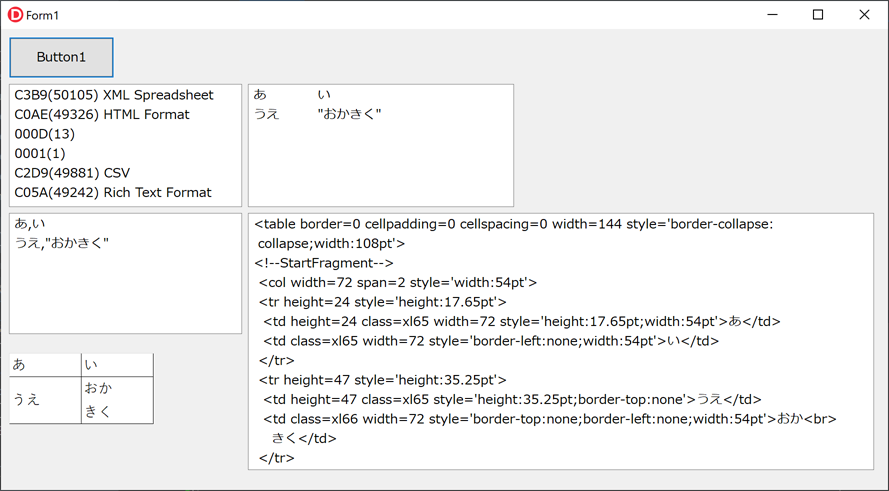
Excelでシートのセル範囲をコピーし、Delphiから様々なフォーマット(テキスト、CSV、HTMLテキスト、ビットマップ)でクリップボードから取り出してみます。
プロジェクトの作成と画面設計
プロジェクトを新規作成(VCLアプリケーション)し、フォーム(Form1)にTButtonを1個、TMemoを4つ、TImageを1個を配置する。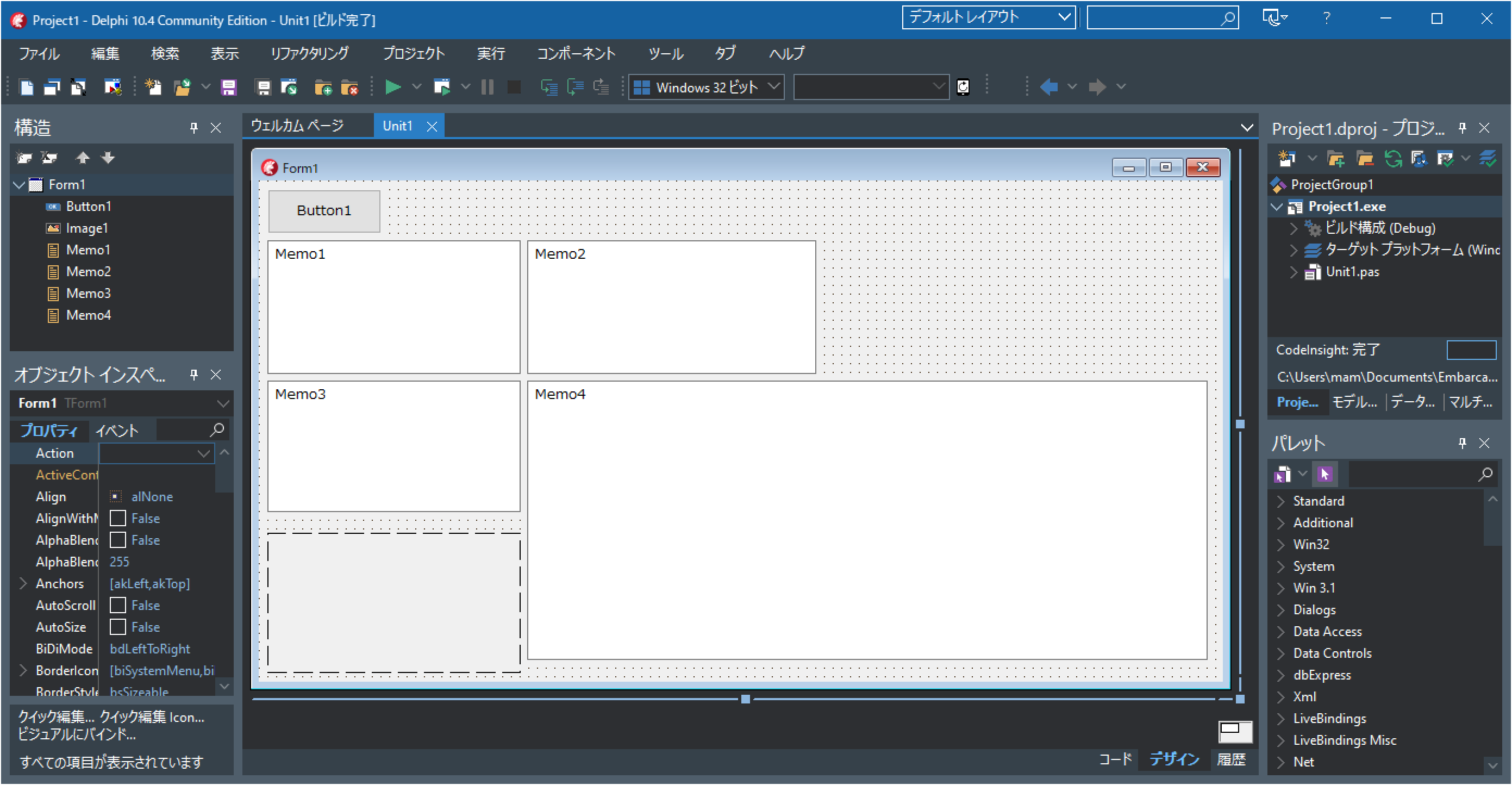
ソースコードの記述
TButton1をダブルクリックして、以下ソースコードを記述する。
unit Unit1;

interface

uses
  Winapi.Windows, Winapi.Messages, System.SysUtils, System.Variants, System.Classes, Vcl.Graphics,
  Vcl.Controls, Vcl.Forms, Vcl.Dialogs, Vcl.ExtCtrls, Vcl.StdCtrls;

type
  TForm1 = class(TForm)
    Button1: TButton;
    Memo1: TMemo;
    Memo2: TMemo;
    Memo3: TMemo;
    Memo4: TMemo;
    Image1: TImage;
    procedure Button1Click(Sender: TObject);
  private
    { Private 宣言 }
  public
    { Public 宣言 }
  end;

var
  Form1: TForm1;

implementation

{$R *.dfm}

uses clipbrd;

procedure TForm1.Button1Click(Sender: TObject);
var CF_HTML,CF_CSV:Cardinal;
    h:NativeUInt;
    p:Pointer;
    size:NativeUint;
    st:string;
    i:integer;
    buf:array[0..350] of Char;
    bytes:TBytes;
begin
  if Clipboard.FormatCount=0 then
  begin
    Memo1.Clear;
    Memo1.Lines.Add('クリップボードは空っぽです');
    exit;
  end;

  //クリップボードの新しいデータ形式をWindowsシステムに登録する
  CF_HTML:=RegisterClipboardFormat('HTML Format');
  CF_CSV:=RegisterClipboardFormat('Csv');

  //クリップボード内の形式を列挙する
  Memo1.Clear;
  for i := 0 to Clipboard.FormatCount-1 do
  begin
    FillChar(buf,sizeof(buf),#0);
    GetClipboardFormatName(
      Clipboard.Formats[i],buf,sizeOf(buf)
    );
    Memo1.Lines.Add(
     IntToHex(Clipboard.Formats[i],4)+'('+
     IntToStr(Clipboard.Formats[i])+') '+
     WideCharToString(@buf[0])
    );
  end;

  //テキスト形式での取得
  Memo2.Clear;
  if Clipboard.HasFormat(CF_TEXT) then
  begin
    Memo2.Lines.Add(Clipboard.AsText);
  end;

  //ビットマップ形式での取得
  if Clipboard.HasFormat(CF_BITMAP) then
  begin
    Image1.Picture.Bitmap.Assign(Clipboard);
  end;

  //クリップボードを開く
  Clipboard.Open;

  //CSV形式での取得
  Memo3.Clear;
  h:=Clipboard.GetAsHandle(CF_CSV);
  if h<>0 then
  begin
    p:=Winapi.Windows.GlobalLock(h);
    if Assigned(p) then
    begin
      size:=GlobalSize(h);
      if size>0 then
      begin
        setlength(bytes,size);
        move(PByte(p)^,bytes[0],size);
        //クリップボードにShift-JISで入っている
        st:=TEncoding.Ansi.GetString(bytes);
        Memo3.Lines.Add(st);
      end;
    end;
    Winapi.Windows.GlobalUnlock(h);
  end;


  //HTML Format形式での取得
  Memo4.Clear;
  h:=Clipboard.GetAsHandle(CF_HTML);
  if h<>0 then
  begin
    p:=Winapi.Windows.GlobalLock(h);
    if Assigned(p) then
    begin
      size:=GlobalSize(h);
      if size>0 then
      begin
        setlength(bytes,size);
        move(PByte(p)^,bytes[0],size);
        //クリップボードにUTF-8で入っている
        st:=TEncoding.UTF8.GetString(bytes);
        Memo4.Lines.Add(st);
      end;
    end;
    Winapi.Windows.GlobalUnlock(h);
  end;


  //クリップボードを閉じる
  Clipboard.Close;
end;

end.
実行する
実行ボタンを押して実行します。(デバッグ実行でもOK)Excelを起動してセル範囲を選択し、クリップボードにコピー(Ctrl+C)します。

Delphiで作成した実行中アプリで、Button1をクリックすると
- Memo1にクリップボード内のフォーマット(形式)一覧
- Memo2にテキスト形式での取得結果
- Memo3にCSV形式での取得結果
- Memo4にHTMLテキスト形式での取得結果
- Image1にビットマップ形式での取得結果