
画像ファイル(BMPなど)から動画ファイル(MP4)を作成(MfPack使用) ~Delphiソースコード集
DelphiでMFPack(Microsoft Media Foundation APIが扱えるライブラリ)を使って画像ファイル(bmp,jpg,png)から動画ファイル(mp4,wmv,avi)を作成します
MfPackのダウンロードとインストール
MfPackのダウンロードとインストールは https://mam-mam.net/delphi/mfpack_install.html を参照してください。
新規アプリケーションの準備
Delphiを起動し
「ファイル」→「新規作成」→「VCLフォームアプリケーション - Delphi」を選択します。
右下のツールパレットから「TButton」をドラッグ&ドロップします。
「ファイル」→「すべて保存」を押し、プロジェクト用フォルダを作成して、ユニット「Unit1.pas」とプロジェクトファイル「Project1.dproj」を保存します。
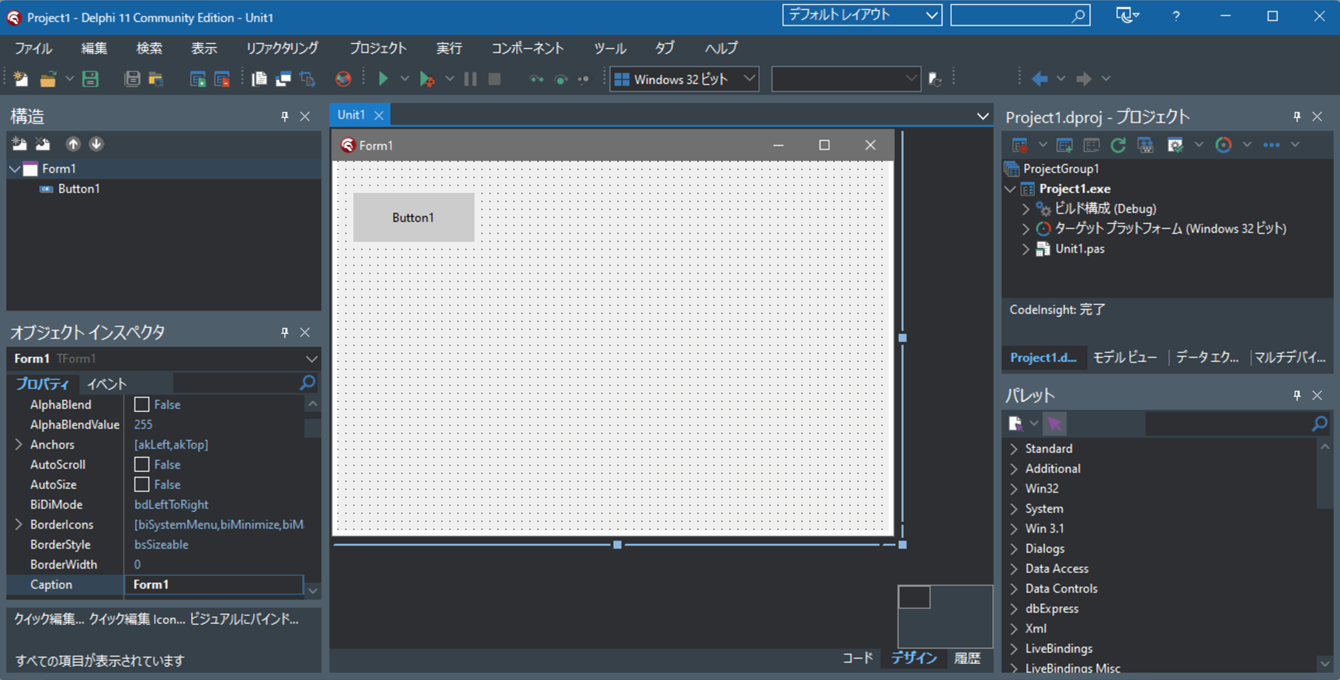
ユニットの作成
「ファイル」→「新規作成」→「ユニット -Delphi」をクリックしてユニットを作成します。
以下ソースコードを貼り付けます。
「UMamSinkWriter.pas」として名前を付けて保存します。
unit UMamSinkWriter;

interface

uses
  {Winapi}
  Winapi.Windows,
  WinApi.ComBaseApi,
  WinApi.WinApiTypes,
  {system}
  System.Classes,
  System.SysUtils,
  {VCL}
  Vcl.Graphics,
  Vcl.Imaging.jpeg,
  Vcl.Imaging.pngimage,
  {ActiveX}
  WinApi.ActiveX.ObjBase,
  {MediaFoundationApi}
  WinApi.MediaFoundationApi.MfUtils,
  WinApi.MediaFoundationApi.MfApi,
  WinApi.MediaFoundationApi.MfReadWrite,
  WinApi.MediaFoundationApi.Mfobjects  ;

type
  TMamSinkWriter = class(TObject)
  private
    fImgList:TStringList;
    fWidth,fHeight:Cardinal;
    fFPS:UINT32;
    fExt:String;//出力ファイル拡張子(.wmvなど)
    function InitializeSinkWriter(
      FileName:String;out ppWriter:IMFSinkWriter;out pStreamIndex:DWORD
    ):HResult;
    function SetVideoFrameBuffer(
      Idx:Integer;var VideoFrameBuffer:array of DWORD):Boolean;
  public
    constructor Create();
    destructor Destroy(); override;
    procedure AddImageFile(FileName:string);
    procedure ClearImageFile();
    procedure WriteVideoFile(FileName:String);
    property Width:Cardinal read fWidth write fWidth;
    property Height:Cardinal read fHeight write fHeight;
    property FPS:UINT32 read fFPS write fFPS;
  end;

implementation

{ TMamSinkWriter }

procedure TMamSinkWriter.AddImageFile(FileName: string);
begin
  fImgList.Add(FileName);
end;

procedure TMamSinkWriter.ClearImageFile;
begin
  fImgList.Clear;
end;

constructor TMamSinkWriter.Create;
begin
  inherited;
  fImgList:=TStringList.Create;
  fWidth:=640;
  fHeight:=480;
  fFPS:=30;
end;


destructor TMamSinkWriter.Destroy;
begin
  fImgList.Free;
  inherited;
end;

function TMamSinkWriter.InitializeSinkWriter(
  FileName:String; out ppWriter:IMFSinkWriter;out pStreamIndex:DWORD
): HResult;
var hr:HResult;
    pMediaTypeOut,pMediaTypeIn:IMFMediaType;
    //書き込む動画のフォーマットのGUID
    VIDEO_ENCODING_FORMAT:TGUID;
    VIDEO_BIT_RATE:UINT32;
begin
  //拡張子(ext)により出力エンコーディングを設定
  if fExt='.wmv' then
    VIDEO_ENCODING_FORMAT:=MFVideoFormat_WMV3
  else if fExt='.mp4' then
    VIDEO_ENCODING_FORMAT:=MFVideoFormat_H264
  else
    VIDEO_ENCODING_FORMAT:=MFVideoFormat_NV12;

  //■書き込むファイル名を設定
  hr:=MFCreateSinkWriterFromURL(
    PChar(FileName),nil,nil,ppWriter
  );

  //■出力のメディアタイプ
  if SUCCEEDED(hr) then
    hr:=MFCreateMediaType(pMediaTypeOut);
  if SUCCEEDED(hr) then
    hr:=pMediaTypeOut.SetGUID(MF_MT_MAJOR_TYPE,MFMediaType_Video);
  //出力エンコーディングの設定
  if SUCCEEDED(hr) then
    hr:=pMediaTypeOut.SetGUID(MF_MT_SUBTYPE,VIDEO_ENCODING_FORMAT);
  //★★出力ビットレートを適当に設定★★
  if SUCCEEDED(hr) then
  begin
    VIDEO_BIT_RATE:=fWidth*fHeight*4*fFPS div 16;
    hr:=pMediaTypeOut.SetUINT32(MF_MT_AVG_BITRATE,VIDEO_BIT_RATE);
  end;
  //インターレースモードをプログレッシブに設定
  if SUCCEEDED(hr) then
    hr:=pMediaTypeOut.SetUINT32(MF_MT_INTERLACE_MODE,MFVideoInterlace_Progressive);
  //出力時の幅と高さを設定
  if SUCCEEDED(hr) then
    hr:=MFSetAttributeSize(pMediaTypeOut,MF_MT_FRAME_SIZE,fWidth,fHeight);
  //出力時のフレームレート(FPS)を設定
  if SUCCEEDED(hr) then
    hr:=MFSetAttributeRatio(pMediaTypeOut,MF_MT_FRAME_RATE,fFPS,1);
  //ピクセル比率の設定
  if SUCCEEDED(hr) then
    hr:=MFSetAttributeRatio(pMediaTypeOut,MF_MT_PIXEL_ASPECT_RATIO,1,1);
  if SUCCEEDED(hr) then
    hr:=ppWriter.AddStream(pMediaTypeOut,pStreamIndex);

  //■入力のメディアタイプ
  if SUCCEEDED(hr) then
    hr:=MFCreateMediaType(pMediaTypeIn);
  if SUCCEEDED(hr) then
    hr:=pMediaTypeIn.SetGUID(MF_MT_MAJOR_TYPE,MFMediaType_Video);
  if SUCCEEDED(hr) then
    hr:=pMediaTypeIn.SetGUID(MF_MT_SUBTYPE,MFVideoFormat_RGB32);
  if SUCCEEDED(hr) then
    hr:=pMediaTypeIn.SetUINT32(MF_MT_INTERLACE_MODE,MFVideoInterlace_Progressive);
  if SUCCEEDED(hr) then
    hr:=MFSetAttributeSize(pMediaTypeIn,MF_MT_FRAME_SIZE,fWidth,fHeight);
  if SUCCEEDED(hr) then
    hr:=MFSetAttributeRatio(pMediaTypeIn,MF_MT_FRAME_RATE,fFPS,1);
  if SUCCEEDED(hr) then
    hr:=MFSetAttributeRatio(pMediaTypeIn,MF_MT_PIXEL_ASPECT_RATIO,1,1);
  if SUCCEEDED(hr) then
    hr:=ppWriter.SetInputMediaType(pStreamIndex,pMediaTypeIn,nil);

  //開始する
  if SUCCEEDED(hr) then
    hr:=ppWriter.BeginWriting();

  SafeRelease(pMediaTypeOut);
  SafeRelease(pMediaTypeIn);
  result:=hr;
end;


function TMamSinkWriter.SetVideoFrameBuffer(
  Idx: Integer;var VideoFrameBuffer: array of DWORD):boolean;
type
    TRGBAArr=array[0..30000] of DWORD;
    PRGBAArr=^TRGBAArr;
var sbmp,dbmp:TBitmap;
    jpg:TJpegImage;
    png:TPngImage;
    ext:String;
    h:UINT64;
    rgba:PRGBAArr;
begin
  result:=False;
  if not FileExists(fImgList[Idx]) then exit;
  ext:=LowerCase(ExtractFileExt(fImgList[Idx]));
  if (ext<>'.bmp') and (ext='.jpg') and
     (ext='.jpeg') and (ext='.png') then
  begin
    exit;
  end;

  sbmp:=TBitmap.Create;
  try
    if ext='.bmp' then
    begin
      sbmp.LoadFromFile(fImgList[Idx]);
    end
    else if (ext='.jpg') or (ext='.jpeg') then
    begin
      jpg:=TJpegImage.Create;
      try
        jpg.LoadFromFile(fImgList[Idx]);
        sbmp.Assign(jpg);
      finally
        jpg.Free;
      end;
    end
    else if ext='.png' then
    begin
      png:=TPngImage.Create;
      try
        png.LoadFromFile(fImgList[Idx]);
        sbmp.Assign(png);
      finally
        png.Free;
      end;
    end;

    dbmp:=TBitmap.Create;
    try
      dbmp.Width:=fWidth;
      dbmp.Height:=fHeight;
      dbmp.PixelFormat:=pf32bit;
      dbmp.Canvas.StretchDraw( Rect(0,0,fWidth,fHeight), sbmp );
      if fExt='.wmv' then
      begin
        for h := 0 to fHeight-1 do
        begin
          //wmvは通常に入れる必要がある
          rgba:=dbmp.ScanLine[h];
          Move(rgba[0],VideoFrameBuffer[h*fWidth],fWidth*4);
        end;
      end
      else
      begin
        for h := 0 to fHeight-1 do
        begin
          //mp4 aviは上下逆に入れる必要がある
          rgba:=dbmp.ScanLine[fHeight-h-1];
          Move(rgba[0],VideoFrameBuffer[h*fWidth],fWidth*4);
        end;
      end;
    finally
      dbmp.Free;
    end;
  finally
    sbmp.Free;
  end;
end;


procedure TMamSinkWriter.WriteVideoFile(FileName:String);
var VideoFrameBuffer: array of DWORD;
    pStreamIndex: DWORD;
    pSinkWriter: IMFSinkWriter;
    rtStart: HNSTIME;//INT64
    hr:HResult;
    i:Integer;
    pBuffer: IMFMediaBuffer;
    pData: PByte;
    pSample: IMFSample;
begin
  SetLength(VideoFrameBuffer,fWidth*fHeight);
  ZeroMemory(@VideoFrameBuffer[0],fWidth*fHeight*4);

  fExt:=LowerCase(System.SysUtils.ExtractFileExt(FileName));
  if (fExt<>'.mp4') and (fExt<>'.wmv') and (fExt<>'.avi') then fExt:='.wmv';

  rtStart:=0;

  hr := CoInitializeEx(nil, COINIT_APARTMENTTHREADED);
  if SUCCEEDED(hr) then
  begin
    hr := MFStartup(MF_VERSION);
    if SUCCEEDED(hr) then
    begin
      hr:=InitializeSinkWriter(FileName,pSinkWriter,pStreamIndex);
      if SUCCEEDED(hr) then
      begin
        for i := 0 to fImgList.Count-1 do
        begin
          SetVideoFrameBuffer(i,VideoFrameBuffer);
          hr:=MFCreateMemoryBuffer(4*fWidth*fHeight,pBuffer);
          if SUCCEEDED(hr) then
          begin
            hr:=pBuffer.Lock(pData,nil,nil);
            if SUCCEEDED(hr) then
            begin
              hr:=MFCopyImage(
                pData,    //コピー先バッファ
                4*fWidth, //コピー先ストライド(ずらす)バイト数
                PByte(VideoFrameBuffer),//コピー元バッファ
                4*fWidth, //コピー元ストライド(ずらす)バイト数
                4*fWidth, //幅のバイト数
                fHeight   //高さ
              );
            end;
            if Assigned(pBuffer) then
              pBuffer.Unlock();
            if SUCCEEDED(hr) then
              hr:=pBuffer.SetCurrentLength(4*fWidth*fHeight);
            if SUCCEEDED(hr) then
              hr:=MFCreateSample(pSample);
            if SUCCEEDED(hr) then
              hr:=pSample.AddBuffer(pBuffer);
            //プレゼンテーション時間 (100 ナノ秒単位)
            if SUCCEEDED(hr) then
              hr:=pSample.SetSampleTime(rtStart);
            //100ナノ秒単位
            if SUCCEEDED(hr) then
              hr:=pSample.SetSampleDuration(10 * 1000 * 1000 div fFPS);
            if SUCCEEDED(hr) then
              hr:=pSinkWriter.WriteSample(pStreamIndex,pSample);
            inc(rtStart,10 * 1000 * 1000 div fFPS);
            SafeRelease(pBuffer);
            SafeRelease(pSample);
          end;
        end;
        pSinkWriter.Finalize;
        SafeRelease(pSinkWriter);
      end;
      MFShutdown();
    end;
    CoUninitialize();
  end;
end;


end.
Button1クリック時のソースコードを記述
「Unit1」のデザインを表示して「Button1」をダブルクリックして以下のようなソースコードを記述します。
unit Unit1;

interface

uses
  Winapi.Windows, Winapi.Messages, System.SysUtils, System.Variants, System.Classes, Vcl.Graphics,
  Vcl.Controls, Vcl.Forms, Vcl.Dialogs, Vcl.StdCtrls;

type
  TForm1 = class(TForm)
    Button1: TButton;
    procedure Button1Click(Sender: TObject);
  private
    { Private 宣言 }
  public
    { Public 宣言 }
  end;

var
  Form1: TForm1;

implementation

{$R *.dfm}

uses UMamSinkWriter;

procedure TForm1.Button1Click(Sender: TObject);
var sw:TMamSinkWriter;
begin
  sw:=TMamSinkWriter.Create;
  try
    //動画にしたい画像ファイル指定します
    sw.AddImageFile('..\..\01.jpg');
    sw.AddImageFile('..\..\02.jpg');
    sw.AddImageFile('..\..\03.jpg');
    sw.AddImageFile('..\..\04.jpg');
    sw.AddImageFile('..\..\05.jpg');
    sw.AddImageFile('..\..\06.jpg');
    sw.AddImageFile('..\..\07.jpg');
    sw.AddImageFile('..\..\08.jpg');
    sw.AddImageFile('..\..\09.jpg');
    sw.AddImageFile('..\..\10.jpg');
    sw.AddImageFile('..\..\11.jpg');
    sw.AddImageFile('..\..\12.jpg');
    sw.AddImageFile('..\..\13.jpg');
    sw.AddImageFile('..\..\14.jpg');
    //動画の縦横サイズを指定します
    sw.Width:=640;
    sw.Height:=360;
    //1秒あたりのフレーム数を指定します
    sw.FPS:=4;
    //動画ファイル名を指定して作成開始
    sw.WriteVideoFile('test.mp4');
  finally
    sw.Free;
  end;
end;

end.
実行
実行して「Button1」をクリックすると、動画ファイル「test.mp4」が生成されます。